From Sora 2 Pro to Kling
ElevenLabs, known for its voice AI, has launched an image and video generation platform along with a visual workflow tool called 'Flows.' Users can now access 24 video models including OpenAI Sora 2 Pro, Google Veo 3.1, and Kling 2.5, plus 15 image models — all in one place...
TL;DR: Now you can type a single line of text, and AI will generate an image → turn it into a video → add narration to deliver finished content. An 'all-in-one AI content factory' has arrived, letting you compare and choose from 24 AI video models on a single screen.
ElevenLabs, the AI voice company valued at $11 billion, has expanded beyond voice into image and video generation. This isn't just adding one proprietary model. They've assembled over 24 of the industry's best AI models from OpenAI, Google, Kling, Runway, and more onto a single platform where anyone can create content in just a few clicks.
From Sora 2 Pro to Veo 3.1 — Choose Your AI Video Model on One Screen
ElevenLabs Image & Video (currently in beta) is a tool that generates images and videos from a single line of text. The most striking feature is the range of AI models available to choose from.

24 Video Models (Key Models)
• OpenAI Sora 2 Pro — Highest quality, cinematic results (3,000 credits)
• Google Veo 3.1 — Excellent realism and prompt adherence (2,000 credits)
• Kling 2.5 — Strong dynamic motion and physics effects (700 credits)
• LTX 2 Pro — 4K resolution, 50 frames per second
• Runway Aleph — Specialized in removing/transforming objects within video
• Kling 2.6 Motion Control — Motion transfer that maps movements from one video onto characters
15 Image Models (Key Models)
• Nano Banana Pro — Reasoning-based image generation, 1K–4K resolution
• Flux 2 Pro — Multilingual text rendering support (great for posters and ads)
• Seedream 4.5 — Multimodal model with up to 4K resolution
• Gen-4 Image Turbo — 2.5x faster than standard models
Flows: Connecting Image → Video → Voice on One Canvas
Creating images and videos separately isn't enough. Flows, released alongside the platform, is a visual workflow tool that lets you connect multiple AI tasks like LEGO blocks to produce complex content all at once.
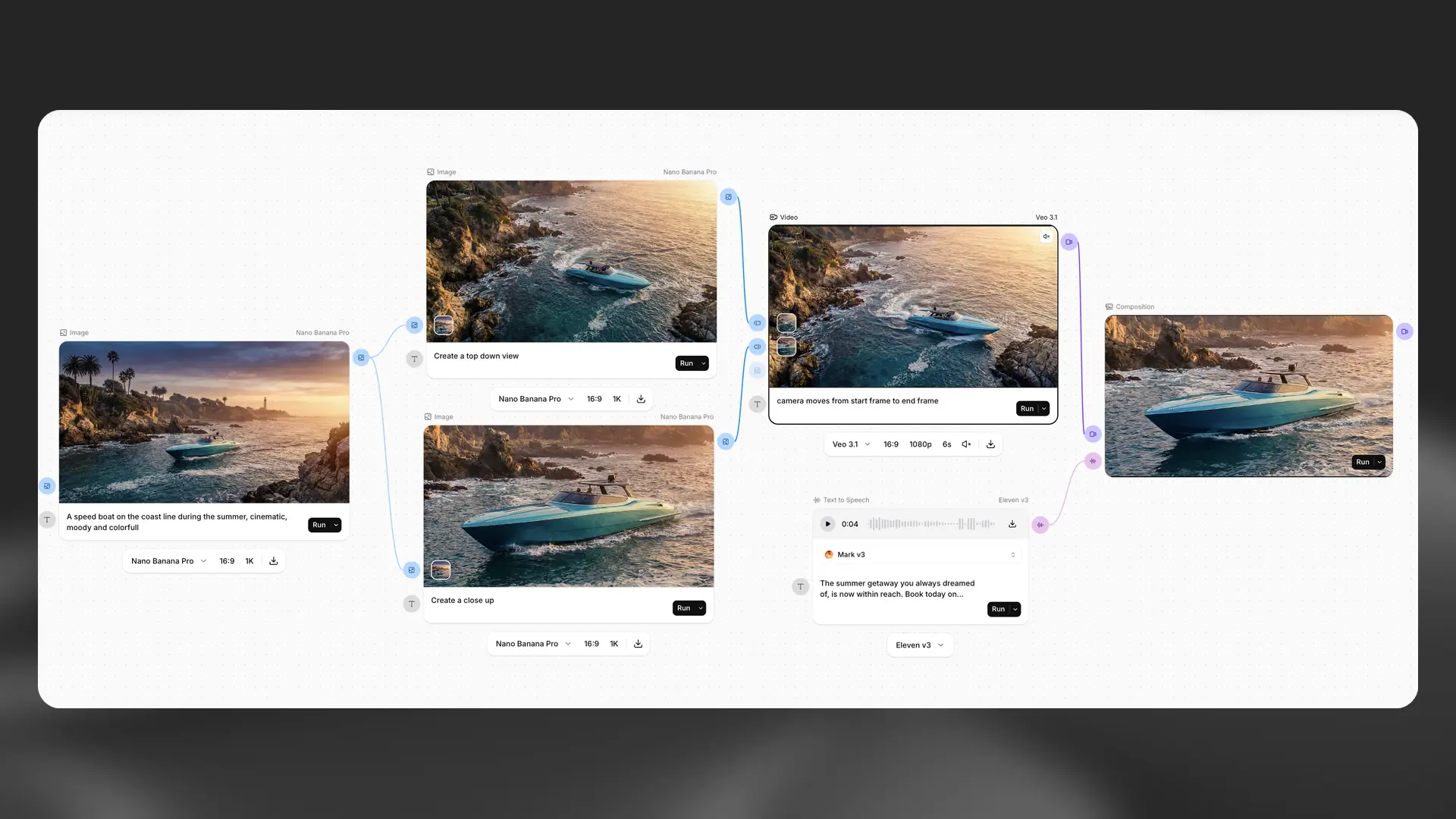
The screenshot above makes the workflow intuitive. Enter "speedboat on a beach" as text on the left, and AI generates an image. Connect that image to the next block, and it's converted into a video. The final block applies AI voice (Eleven v3) narration saying "Book the summer vacation of your dreams."
The key is non-destructive editing. Want to change only the voice? Just re-run the voice block. No need to regenerate the video from scratch.
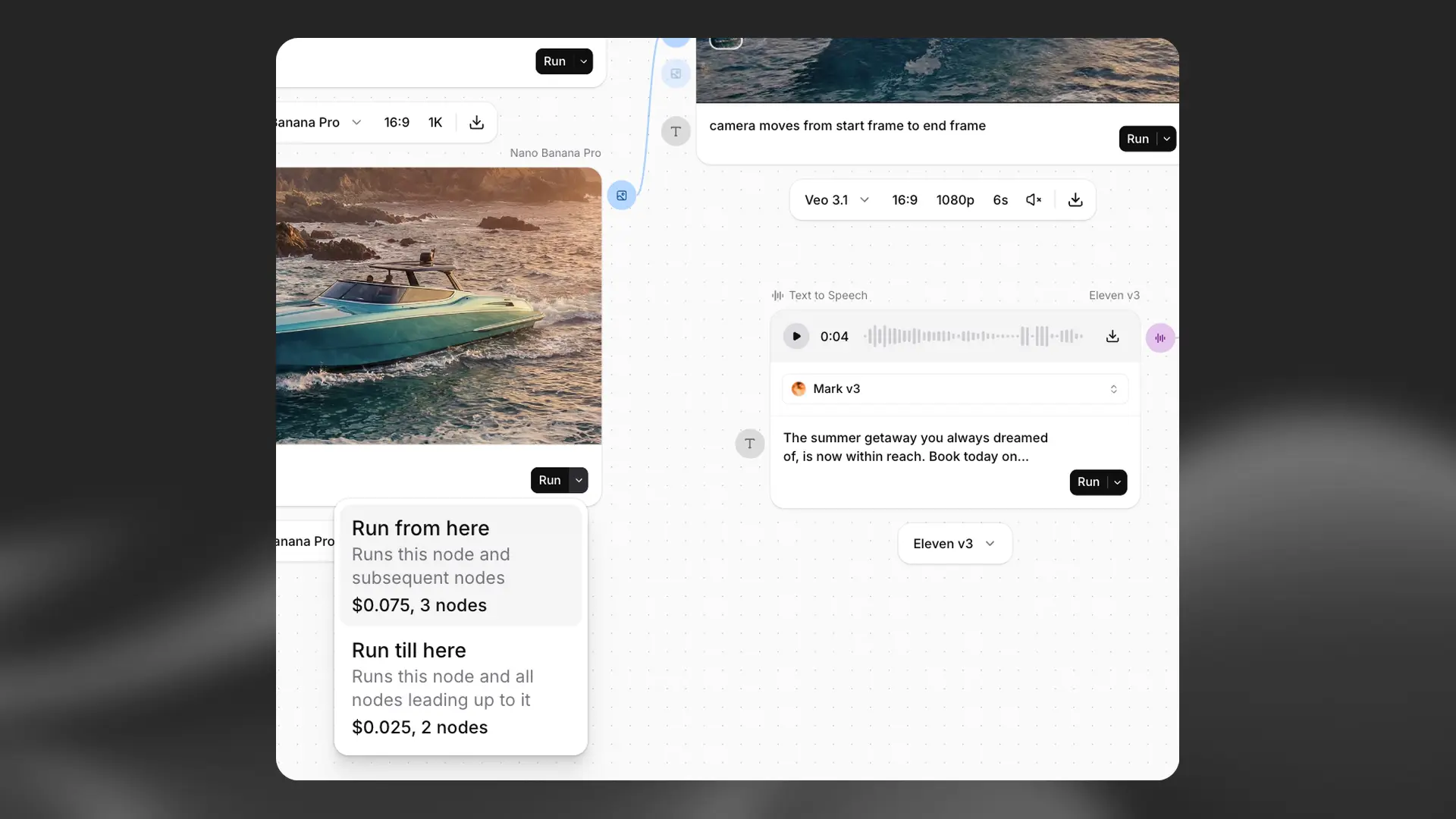
Costs are displayed transparently. Hover over any block and you'll see the exact credit usage, such as "Run from here: $0.075, 3 nodes."
Types of Blocks Available in Flows
Generation blocks: Text-to-speech (TTS), image generation, video generation, AI music, sound effects
Processing blocks: Text input, media upload, lip sync, resolution upscale, compositing (preview)
Integrated models: 35+ image and video AI models + ElevenLabs' own voice, music, and sound effects models
Can You Start for Free?
With a free account, you can generate images up to 3 times per day. However, video generation and Flows require a paid subscription. Credit costs vary by model — Kling 2.5 uses 700 credits, Sora 2 Pro uses 3,000 credits, and Google Veo 3.1 uses 2,000–8,000 credits.
Videos can be generated from 480p to 4K resolution, in lengths from 2 to 20 seconds, with support for various aspect ratios including 21:9 (cinematic), 16:9 (YouTube), and 9:16 (TikTok/Reels).
Lip Sync and Upscaling — Post-Processing in One Place
You can apply lip sync (AI matches mouth movements to audio) to generated videos. Four lip sync models are available: Omnihuman 1.5 for creating talking videos from a single photo, Veed LipSync for adjusting mouth movements in dubbed videos, and Creatify Aurora for rendering eye blinks and breathing.
If the resolution isn't enough, Topaz Upscale can enlarge it up to 4x, and frame rates can be adjusted from 24 to 60fps.
What This Means for Content Creators
Until now, creating AI content meant working across multiple tools — Midjourney for images, Runway for video, ElevenLabs for voice, and yet another tool for music — then combining everything in an editing program. ElevenLabs' new platform handles the entire process in one place.
YouTube creators can automate a single workflow from thumbnail generation → intro video production → narration synthesis. Marketers can turn product photos into ad videos and add multilingual narration all at once. Small business owners can get started right away with built-in templates like "perfume commercial" or "e-commerce product demo."
How to Get Started
Create a free account on the ElevenLabs website and start generating images right away from the Image & Video tab. For Flows, subscribe to a paid plan and click "New Flow" in the dashboard to open a blank canvas.
Image & Video is currently in beta, and Flows is in alpha. API access (programmatic access) for Flows is planned for a future release.
From Voice AI to a Full 'Content AI Platform'
ElevenLabs started in 2023 as a text-to-speech service and expanded into music generation (Eleven Music), sound effects, and dubbing by 2025. With the addition of image and video generation, it has become an all-in-one platform where "you type text and get finished multimedia content." Having raised $500 million from Sequoia Capital and others in February 2026 at an $11 billion valuation, all eyes are on whether it can reshape the AI content creation market.
If you'd like to learn more about AI and vibe coding, check out our Free Learning Guide.
Related Content — More AI News | Free Learning Guide
Sources
Stay updated on AI news
Simple explanations of the latest AI developments