This plugin shows everything Claude Code is doing — and it just hit 6K GitHub stars
Claude HUD adds a live dashboard to your terminal showing context usage, running agents, and task progress. 6,200 stars and climbing.
If you've ever wondered what Claude Code is actually doing while you wait — how much of its memory it's used, which files it's reading, or whether your tasks are actually progressing — there's now a plugin that answers all of that in real time.
Claude HUD just hit 6,200 GitHub stars (gaining over 1,000 in a single day) and it's the #1 trending repository today. It's a free, open-source plugin that adds a live status dashboard right inside your terminal.
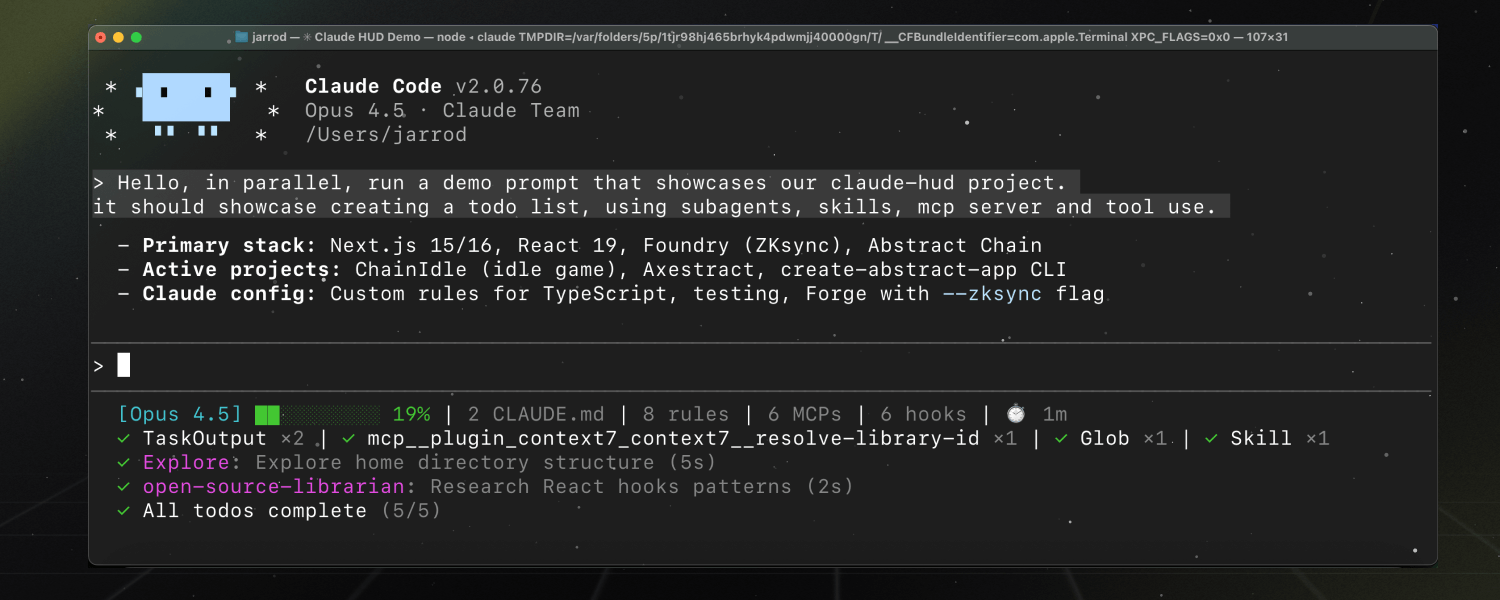
What you actually see
The status bar at the bottom of your terminal shows several things at once:
Context health — a visual bar showing how much of Claude's "working memory" (context window) has been used. When it fills up, Claude starts forgetting earlier instructions. Now you can see it happening in real time.
Tool activity — live counters showing how many files Claude has read, edited, or searched. You can see it working instead of just waiting.
Agent tracking — when Claude spawns sub-agents (mini workers handling parallel tasks), you see each one and its status.
Todo progress — shows task completion like "3/5 todos done" so you know how far along a complex job is.
Three lines to install
Setting it up takes about 30 seconds inside Claude Code:
/plugin marketplace add jarrodwatts/claude-hud
/plugin install claude-hud
/claude-hud:setup
The /claude-hud:setup command automatically configures your terminal's status line. You'll see the dashboard appear immediately.
Customizable layouts for different workflows
Not everyone wants all the information at once. Claude HUD offers three preset layouts:
Full — everything visible: context, tools, agents, todos, git branch, rate limits
Essential — context health and tool activity only
Minimal — just the context percentage and git branch
You can also fine-tune individual elements with /claude-hud:configure — choosing directory depth, color schemes, and which metrics to show.
Who benefits most
Heavy Claude Code users who run long coding sessions will immediately notice when context is running low — before Claude starts producing lower-quality output. Team leads managing multiple projects can quickly glance at the status bar to see if Claude is still working or has stalled. Beginners get a window into what's happening "under the hood" without needing to understand the technical details.
Why it's trending
Claude Code is powerful but opaque — you type a prompt and wait. Claude HUD solves a real frustration by making the invisible visible. Built by developer Jarrod Watts, the plugin has grown from zero to 6,200 stars since its first release (v0.0.9, March 5, 2026). It requires Claude Code v1.0.80+ and Node.js 18+.
The plugin is MIT-licensed and fully open source on GitHub.
Related Content — Get Started with Easy Claude Code | Free Learning Guides | More AI News
Stay updated on AI news
Simple explanations of the latest AI developments