Coding for Ten by Yourself — YC CEO's 13 Expert Modes for Claude Code Hit 20,000 GitHub Stars
Y Combinator CEO Garry Tan has open-sourced gstack, a collection of 13 workflow tools for Claude Code. From CEO review and code inspection to QA automation and design audits — it crossed 20,000 GitHub stars in just one week.
If you've been using Claude Code (an AI coding assistant), chances are you've only ever used it in one mode. Garry Tan, CEO of Y Combinator (Silicon Valley's largest startup accelerator), built a tool to fix exactly that. gstack — a free, open-source tool that adds 13 "expert modes" to Claude Code, letting you switch the AI between roles like CEO, designer, and QA engineer on demand.
Just one week after launch, it hit 19,600 GitHub stars and 2,200 forks, generating an explosive response from the developer community.
Why You Shouldn't Ask One AI to Handle Planning, Review, and Deployment All at Once
Garry Tan's motivation for building gstack is straightforward: "Planning isn't reviewing, and reviewing isn't shipping. A founder's instincts and an engineer's rigor are different things." Asking one AI to do everything at once gives you mediocre results across the board.
gstack solves this with "slash commands" (typed shortcuts that switch the AI's behavior). Type /plan-ceo-review and the AI enters "founder mode," starting by asking "Is what you're building actually the right product?" Type /review and it becomes a strict senior developer, hunting down bugs that pass automated tests but blow up in real production.
13 Expert Modes — What Each One Does
Additional modes include /qa-design-review (audit design and apply fixes directly), /retro (team retrospective facilitation), /document-release (automatic documentation updates), /setup-browser-cookies (import browser cookies for authenticated testing), and /qa-only (bug report without fixes).
Real-World Workflow — Building a Feature Across 5 Modes
Here's how Garry Tan actually uses gstack in practice. Take building a "product photo upload feature" as an example:
Step 1: /plan-ceo-review
→ AI suggests: "The real 10/10 product isn't just photo upload —
   it's auto-recognizing items from photos and recommending prices."

Step 2: /plan-eng-review
→ Generates architecture diagram: upload → classify → enrich → draft pipeline

Step 3: (Code implementation)

Step 4: /review
→ Catches: "Selecting a cover photo in two tabs simultaneously causes an overwrite"
   "Prompt injection vulnerability (where malicious input hijacks AI behavior)
   exists when pulling in external data"

Step 5: /ship → /qa
→ Deploys code, confirms 8 file changes, passes tests across 3 routes
Running 10 AIs at Once — Parallel Work with Conductor
gstack's real power comes when paired with a companion app called Conductor. Conductor is a Mac app that runs multiple Claude Code sessions simultaneously. Each session operates in its own isolated workspace so they don't interfere with each other.
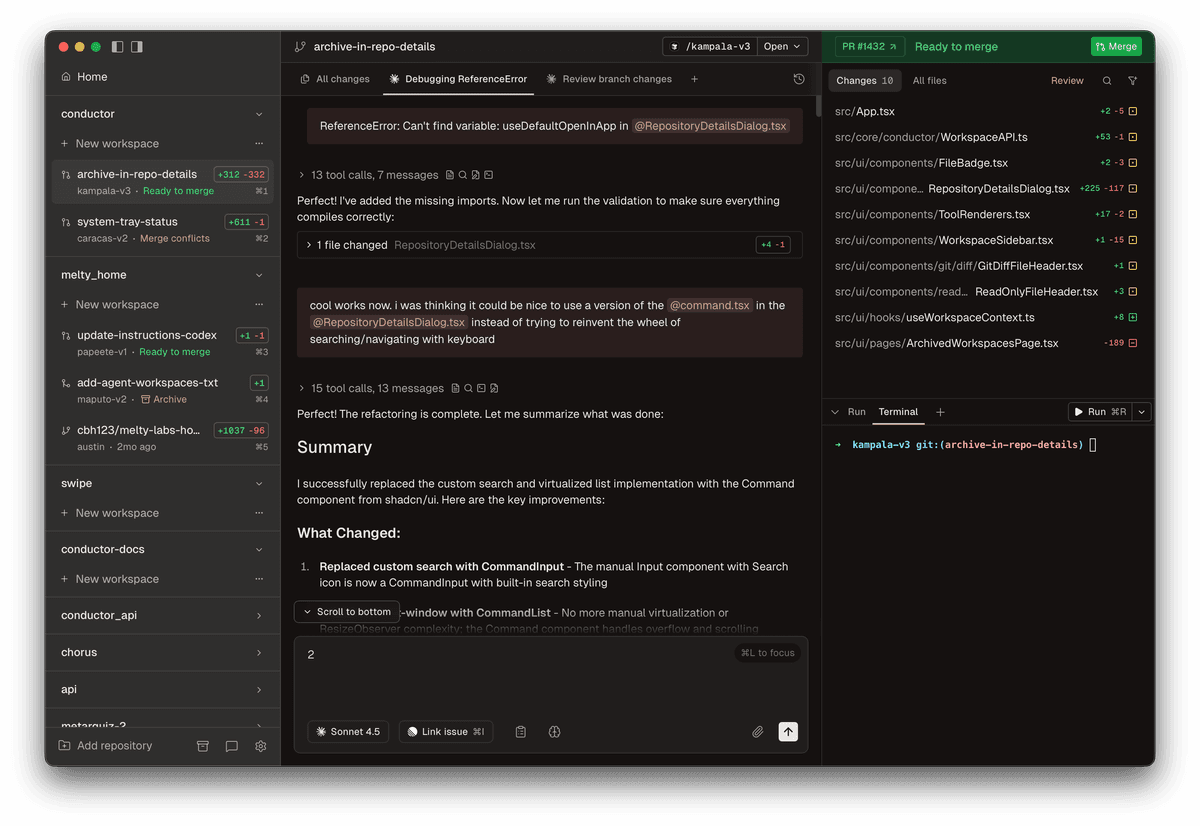
For example: one session runs /qa against the staging server (a test environment that mirrors production), another runs /review on open PRs, and a third session builds a new feature — all at the same time. Garry Tan says this is how he works every single day. Engineers at Stripe, Notion, and Life360 are also using Conductor.
As Garry Tan puts it: "One person running 10 parallel AIs, each with its own thinking mode. This isn't an incremental improvement — it's a fundamentally different way of building software."
How to Install and Try It Right Now
If you already have Claude Code installed, one line in your terminal is all it takes:
git clone https://github.com/garrytan/gstack.git ~/.claude/skills/gstack && cd ~/.claude/skills/gstack && ./setupRequirements: Claude Code, Git (version control software for tracking code changes), Bun v1.0 or higher (a fast JavaScript runtime). Once installed, commands like /plan-ceo-review, /review, and /qa are immediately available inside Claude Code.
To share gstack across your whole team, add it to your project folder:
cp -Rf ~/.claude/skills/gstack .claude/skills/gstack && rm -rf .claude/skills/gstack/.git && cd .claude/skills/gstack && ./setupOnce added to the project, any teammate who runs git clone (downloads the repository) will have gstack ready to use automatically.
Why This Tool Is Making Waves — The Next Step in AI Coding
Until now, progress in AI coding tools has focused almost entirely on "smarter models." gstack asks a different question: "Even with the same AI, the results change completely depending on what 'role' you assign it."
Ask an AI to "review this code" and you'll get answers of wildly varying depth every time. But with gstack's /review, you always get the same standard of scrutiny — race conditions, security vulnerabilities, and missing test coverage, every single time. Consistency is the key.
Especially notable is the "AI Slop detection" feature in /plan-design-review. It automatically flags patterns that scream "AI-generated website" — three-column icon grids, purple gradients, nothing but Inter font — and flags them as "this looks like a template." It's particularly useful for anyone who wants to build with AI but not look like they did.
Garry Tan has said he personally writes 10,000 lines of code and opens 10 PRs every day. The fact that the CEO of Y Combinator is actively using and sharing this tool makes it a compelling real-world benchmark for what AI-powered development can look like.
Related — Get Started with AI Coding | Free Learning Guide | More AI News
Stay updated on AI news
Simple explanations of the latest AI developments