Google Gemini Can Now Read Your Emails, Photos, and Calendar to Give Personalized Answers — Now Free for All U.S. Users
Google is expanding its Gemini Personal Intelligence feature — previously limited to paid subscribers — to all free users in the United States. By connecting Gmail, Google Photos, Drive, Calendar, and YouTube, you can now use it as your own personal AI assistant.
Google has opened the 'Personal Intelligence' feature built into its AI assistant Gemini to all free users in the United States. Previously, only paid plan (Gemini Advanced) subscribers could access it — but now anyone with a personal Google account can use it.
The core idea is simple: Gemini reads your Gmail, Google Photos, Calendar, Drive, YouTube, Maps, and search history to give you answers tailored specifically to you. For example, ask "How do I get my laptop repaired under warranty?" and Gemini will find the purchase confirmation email in your Gmail, then surface the model name and warranty details — no digging required.
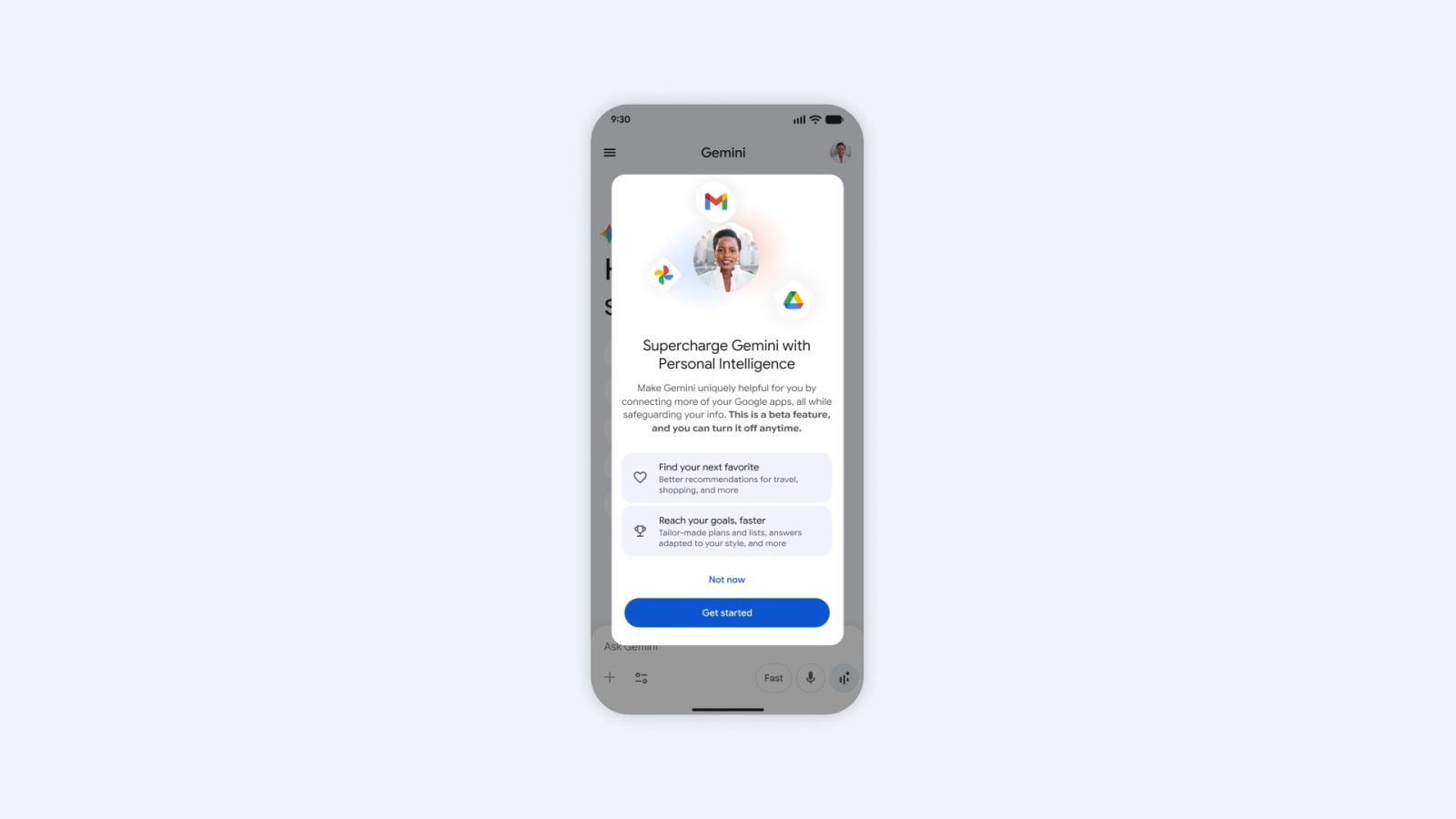
6 Google Services You Can Connect
When you turn on Personal Intelligence, you choose exactly which apps to link to Gemini. It works with checkboxes, so you can leave out any services you'd rather keep private.
Available services to connect:

Real-World Use Cases
Looking at the examples Google has shared, it becomes clear this feature is less of a search helper and more of a genuine personal assistant.
🔧 Device Warranty Help
"I want to exchange the Bluetooth earbuds I bought last month." → Gemini searches your Gmail for the purchase history and pulls together the model name, purchase date, and warranty terms. No more hunting through old receipts.
✈️ Layover Trip Planning
"I have a 3-hour layover in Paris on my way from Seoul — what can I do?" → Gemini checks your flight time in Calendar, factors in your food preferences from your search history, and maps out nearby restaurants with a realistic route.
🎯 Personalized Recommendations
"What should I do this weekend?" → Gemini combines your YouTube watch history, search history, and locations from your photos to suggest activities that match your actual interests — not a generic list, but recommendations made just for you.
Is Your Personal Data Safe? — 3 Privacy Safeguards
It's completely understandable to feel uneasy about an AI reading your emails and photos. Google has put three safeguards in place.
First, it's opt-in (meaning you have to actively choose to enable it). Unless you press the "Get started" button yourself, nothing accesses your data. It's off by default.
Second, you can choose which services to connect. You could link Gmail while leaving YouTube out, for example. It's as simple as ticking a checkbox, as shown in the screenshot below.

Third, you can turn it off at any time. Disconnecting in Gemini's settings immediately cuts off all data access. The feature is currently labeled as beta (an early version that is still being refined), suggesting Google is actively collecting user feedback to improve it.
Available in Three Places: Gemini App, Chrome, and AI Mode
Personal Intelligence works across the Gemini mobile app, Gemini inside the Chrome browser, and Google Search's AI Mode. No separate app install is required — you can activate it directly inside the Google services you already use every day.
For now, it is only available on personal Google accounts in the United States. Users outside the U.S. cannot access it yet, but the fact that Google is unlocking a previously paid feature for free is a strong signal that a global rollout is not far off.
How Is This Different from ChatGPT or Claude?
ChatGPT and Claude can analyze files you upload to them. But Gemini Personal Intelligence works differently at a fundamental level — there is nothing to upload, because it automatically taps into data already stored in your Google ecosystem.
Most people already send and receive email through Gmail, store photos in Google Photos, and manage their schedule in Google Calendar. The ability to connect all of that to an AI seamlessly is a unique advantage that only Google holds. It is an area where OpenAI or Anthropic simply cannot compete on equal footing — at least not yet.
That said, privacy concerns are legitimate. An AI that can read your emails, photos, and search history means sensitive personal information is now being processed by an AI system. For users who trust Google, this is a genuinely groundbreaking convenience feature. But if you are privacy-conscious, it is worth being deliberate about exactly which services you choose to connect.
What to Do Right Now If You Are a Google User
If you are in the U.S. and have a personal Google account, open the Gemini app now and check whether the Personal Intelligence activation popup appears. If you are outside the U.S., it is worth keeping an eye on when Google extends this globally — especially now that a paid feature has moved to free.
Google's play in the AI competition was not to build a smarter model — it was to build "the AI that knows your data best." With emails, photos, schedules, and search history already in its hands, this update sends a clear message: Google holds the most advantageous position of any player in the AI assistant market.
Related content — Get started with AI | Free learning guide | More AI news
Stay updated on AI news
Simple explanations of the latest AI developments