A Free AI Researcher That Searches 600 Times Per Question Just Launched — MiroThinker 1.7
MiroMindAI has released MiroThinker 1.7, a 235B-parameter open-source deep research agent. It achieved top open-source scores on BrowseComp (74%) and GAIA (82.7%), and can call tools up to 600 times per query to conduct thorough, multi-step research.
You've probably asked an AI a question and gotten a shallow answer based on one or two quick searches. MiroMindAI's MiroThinker 1.7 is different. Given a single question, it will perform up to 600 rounds of web searches, code execution, and document analysis before delivering an answer. And the whole thing is free and open-source.
- 235B parameter open-source model — free for anyone to use
- Achieved BrowseComp 74% (web search accuracy) and GAIA 82.7% (multi-step reasoning) — both open-source records
- A lightweight 30B mini version is also available — no high-end GPU required
What Is Deep Research — and Why Does It Matter?
"Deep Research" means an AI doesn't just run a single search and stop — it investigates a topic in multiple stages, the way a human researcher would. For example, if you ask "What is the outlook for the electric vehicle market in 2026?", a typical AI summarizes the top few search results. A deep research AI does this instead:
OpenAI and Google offer this kind of deep research capability only to paid subscribers ($20–$30/month). MiroThinker makes it available as a free, open-source tool.
MiroThinker 1.7 — Performance by the Numbers
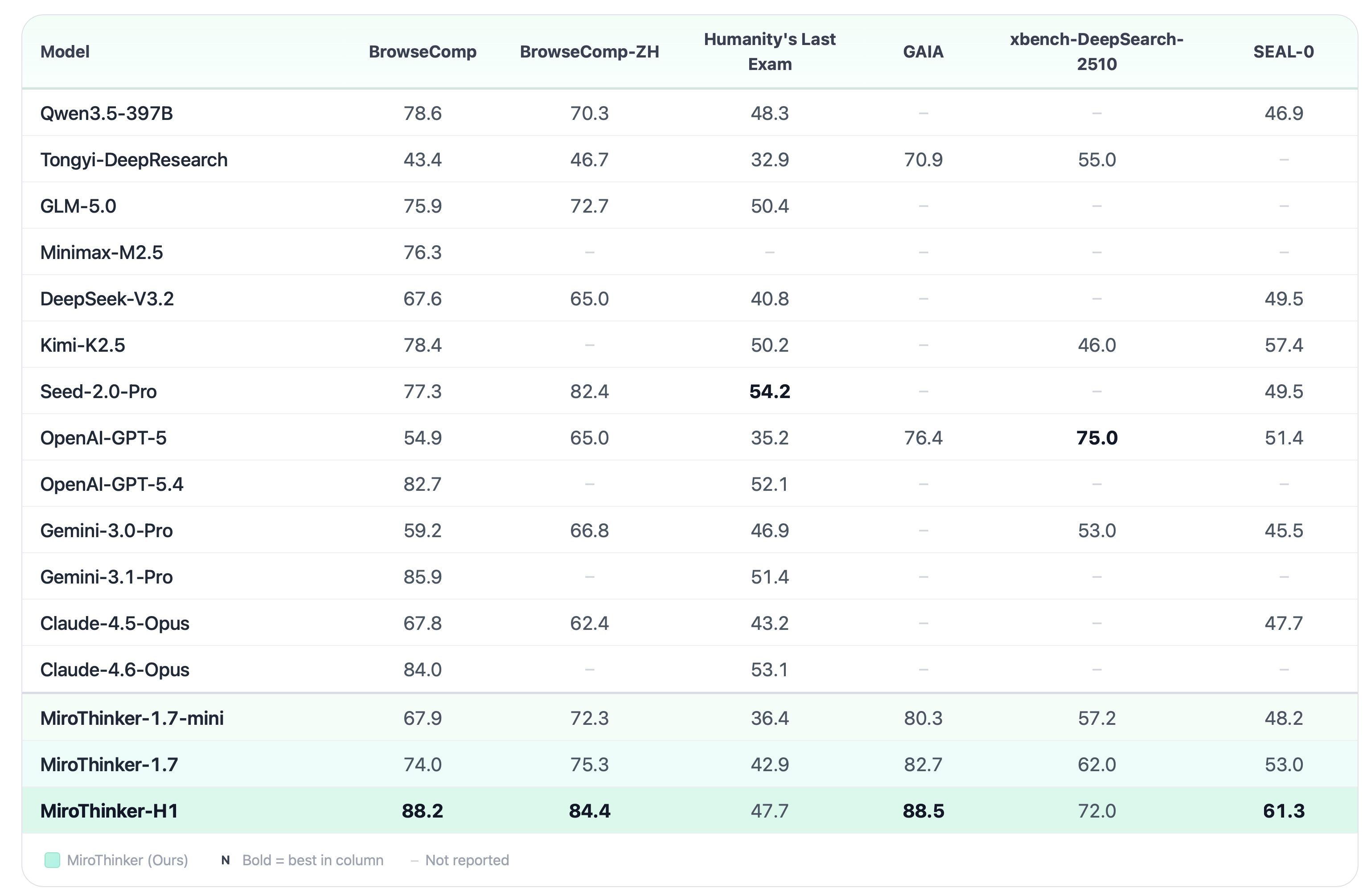
MiroThinker 1.7 has set new open-source records across several standard AI benchmarks.
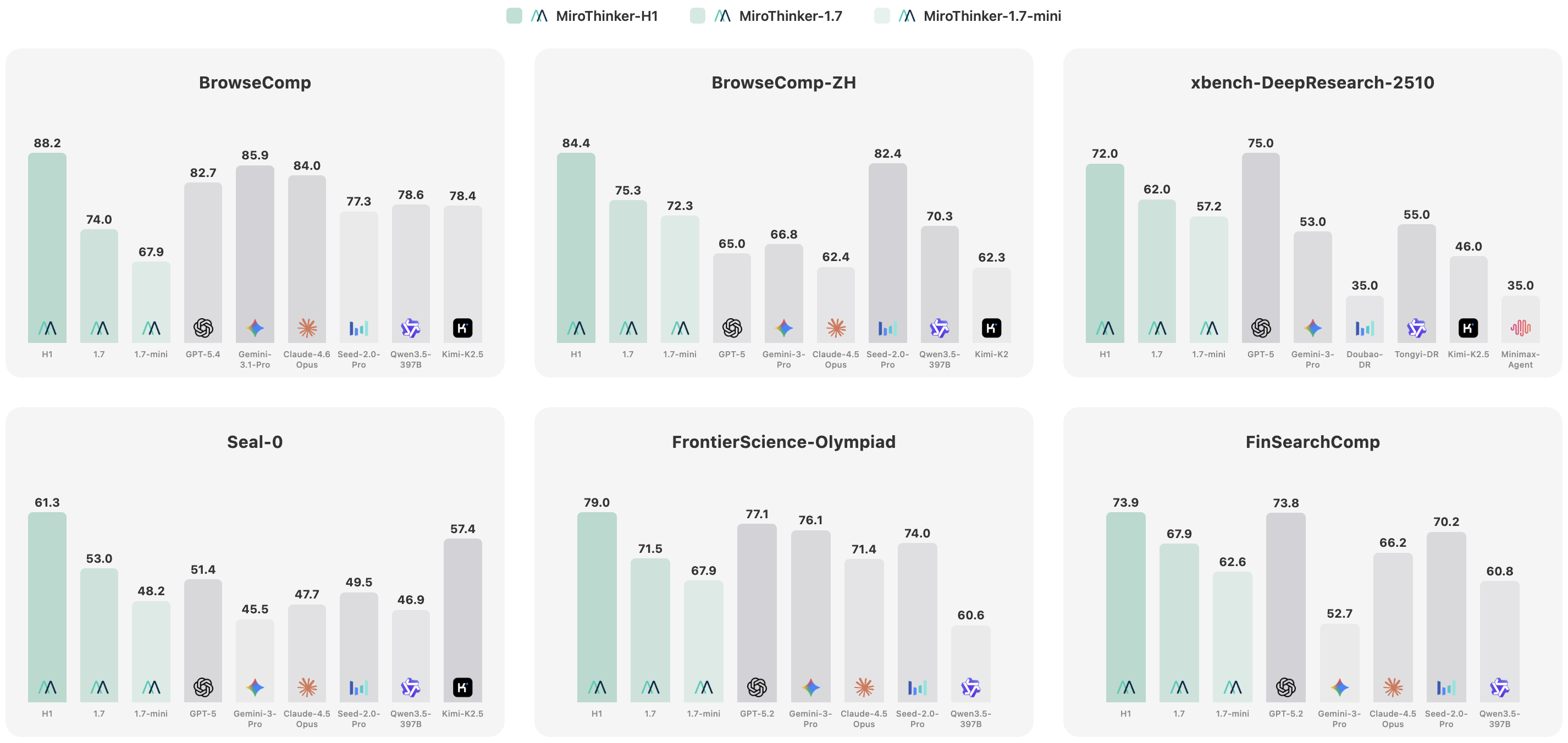
Key Benchmark Scorecard
| Benchmark | What It Measures | Score |
|---|---|---|
| BrowseComp | Ability to accurately find hard-to-locate information on the web | 74.0% |
| BrowseComp-ZH | Web search accuracy in Chinese | 75.3% |
| GAIA | Ability to answer complex questions through multi-step reasoning | 82.7% |
| HLE-Text | Solving expert-level, high-difficulty problems | 42.9% |
For context, here's how previous open-source models performed:
- Search-o1 (7B): BrowseComp 17.5%
- WebDancer (7B): 31.0%
- WebSailor (7B): 37.9%
- MiroThinker v1.0: 47.1%
MiroThinker 1.7 achieves nearly double the score of the previous open-source leader.
How It Works — A 4-Stage Architecture
MiroThinker isn't just one large AI model. It's built like a team of four specialists working together:
Analyzes the question and builds a research plan. It decides the order of searches and which sources to prioritize — like a strategist laying out a game plan.
Actually performs the web searches, code execution, and document analysis. It can use tools up to 600 times for a single query.
Reviews the reasoning chain for logical errors. It catches "false solutions" and flawed conclusions before they make it into the final answer.
Handles safety checks and final validation. If the result looks wrong, it rolls back and sends the process back for another pass.
Two Sizes — Pick the One That Fits Your Hardware
MiroThinker 1.7 is available in two versions:
MiroThinker-1.7 (235B)
The full-power version. Delivers the top benchmark scores: BrowseComp 74%, GAIA 82.7%. Requires 48GB or more of GPU memory (VRAM). Best suited for cloud servers or high-end workstations.
Download on HuggingFace (677 downloads)
MiroThinker-1.7-mini (30B)
The lightweight version. Runs on 16GB of GPU memory (an RTX 4060 Ti or better). Performance is lower than the 235B model, but it's more than capable for everyday research tasks.
Download on HuggingFace (819 downloads)
How to Try It
The easiest way is to use the free online demo hosted by MiroMindAI. No installation needed — just open your browser and start a deep research session.
To run it locally on your own machine:
# 1. Clone the repository
git clone https://github.com/MiroMindAI/MiroThinker.git
cd MiroThinker/apps/gradio-demo

# 2. Set up required API keys in a .env file
# - Serper (web search — free tier: 2,500 queries)
# - E2B (code execution — free tier available)
# - Jina (web page reading — free tier available)

# 3. Install dependencies and run
uv sync
uv run main.py
# → Access at http://localhost:8080
All three external services (Serper, E2B, Jina) offer free tiers, so you can get started with zero upfront cost.
Who Is This For?
How It Differs from MiroFish — Same Company, Different Tool
MiroMindAI previously released MiroFish, an AI agent swarm (a system where thousands of AI agents run simultaneously) prediction engine. If MiroFish is about "running thousands of AI agents in parallel to forecast outcomes," MiroThinker is about "one AI going deep on a single question." They serve entirely different purposes.
Limitations and Caveats
There are real constraints. Running the 235B model locally requires expensive, high-end GPU hardware (minimum 48GB VRAM). The 30B mini version works on consumer gaming GPUs (RTX 4060 Ti or better), but with reduced performance. The project currently has around 7,000 GitHub stars, meaning it's still in relatively early stages — long-term stability and support are yet to be proven.
That said, the fact that deep research — previously locked behind paid subscriptions — is now available as free open-source software is a clear inflection point. There are no official head-to-head numbers against OpenAI Deep Research or Google Gemini Deep Research yet, but this is the first time an open-source deep research agent has reached this level of performance.
Related Content — Get Started with AI Automation | Free Learning Guide | More AI News
Sources
Stay updated on AI news
Simple explanations of the latest AI developments