n8n 2.13: AI agents can now browse the web for you
n8n 2.13.0 adds web-fetch for AI agents, Chat Hub on the workflow canvas, and custom tracing — making the 179K-star automation platform smarter than ever.
n8n, the open-source workflow automation platform with 179,000+ GitHub stars, just dropped version 2.13.0 — and it's a big one for anyone building AI-powered automations. The headline feature: your AI agents can now fetch external documentation and web content on their own, without you lifting a finger.
If you've ever wished your automated workflows could "look things up" before making decisions, this is exactly that.
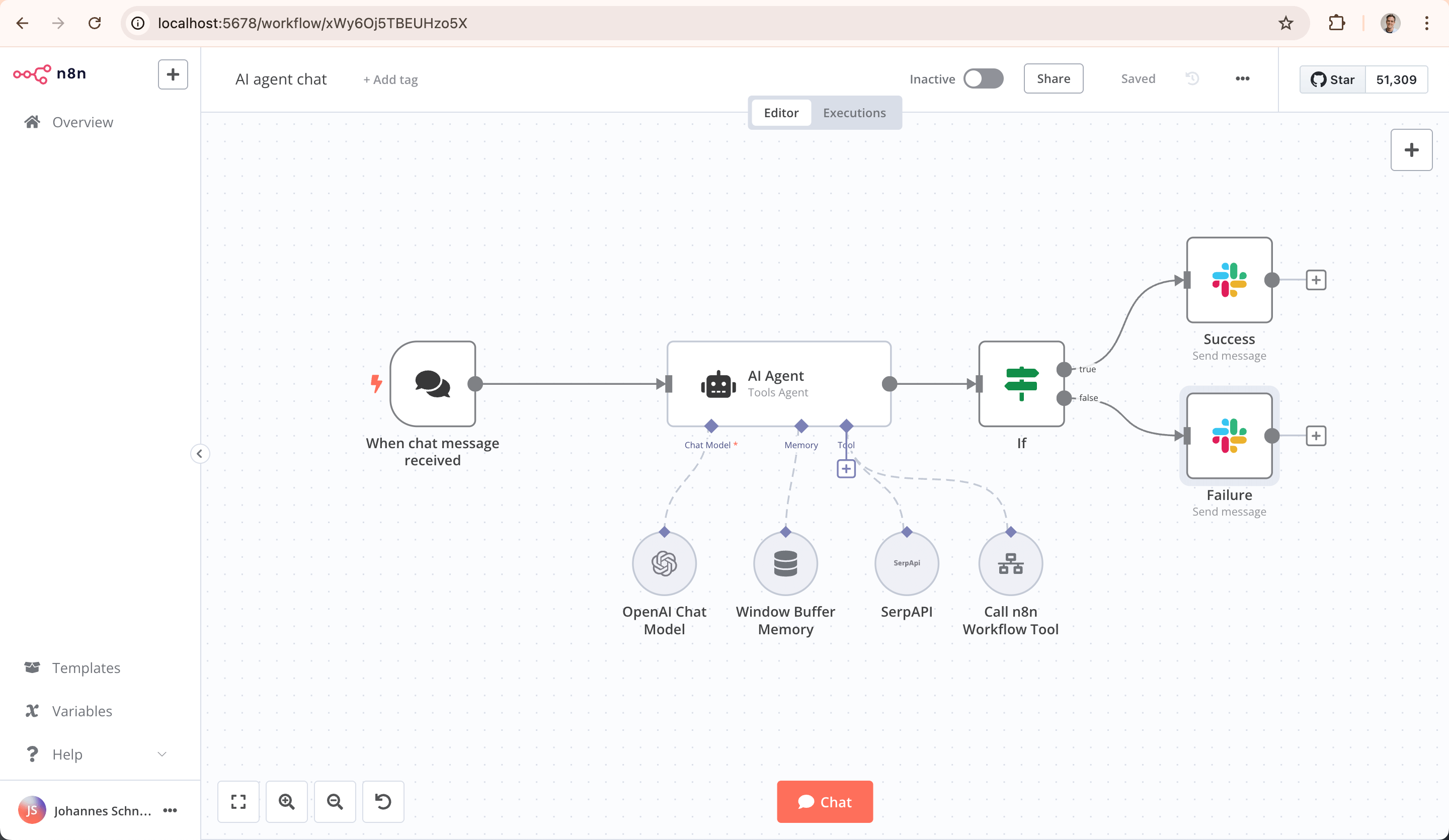
AI agents that can read the web
The biggest addition in 2.13.0 is the web-fetch tool for AI Builder. This lets AI agents inside your workflows retrieve external documentation, web pages, and reference material in real time. Think of it like giving your AI assistant a browser — it can go look up product specs, API docs, or company policies before completing a task.
Previously, n8n's AI agents could only work with data you explicitly piped into the workflow. Now they can go find what they need. This is a game-changer for support bots, research automations, and content workflows.
Chat Hub lands on the canvas
The second major feature is Chat Hub on the workflow canvas. You can now interact with your AI agents directly from the visual editor — no need to switch to a separate testing panel. Build a workflow, chat with the AI inside it, tweak it, repeat.
This makes prototyping AI workflows dramatically faster. You build, test, and refine in the same view.
What's new in n8n 2.13.0 — at a glance
- Web-fetch tool — AI agents can browse external docs and web pages mid-workflow
- Chat Hub on canvas — test and talk to your AI agents right inside the editor
- Custom tracing metadata — track exactly what your AI agents are doing (and why)
- Chat session types — organize conversations with AI by category
- $now and $today variables — time-aware expressions in all workflows
- Role-based external secrets — control who can access sensitive credentials
- 40+ bug fixes — including MCP tool fixes, MongoDB vector store improvements, and ARM64 stability
Six types of AI agents — no code required
For those new to n8n, the platform already supports six different AI agent types you can drag-and-drop into workflows:
All of these now benefit from the new web-fetch capability and improved tracing. And they work with every major AI provider: OpenAI, Anthropic (Claude), Google Gemini, Mistral, Groq, Ollama, DeepSeek, and more.
Who should care
If you're a marketer, you can now build workflows where an AI agent researches competitor pricing pages before drafting your campaign copy — automatically.
If you run customer support, your AI chatbot can look up your latest help docs in real time instead of working from stale training data.
If you're a solo founder or freelancer, n8n's 400+ integrations (Slack, Gmail, Notion, Google Sheets, HubSpot, and hundreds more) combined with AI agents mean you can automate workflows that used to require a whole team.
Try it in 60 seconds
n8n is free to self-host. Run this single command to get started:
npx n8nOr with Docker:
docker volume create n8n_data
docker run -it --rm --name n8n -p 5678:5678 -v n8n_data:/home/node/.n8n docker.n8n.io/n8nio/n8n
Then open localhost:5678 in your browser. The visual editor loads instantly — drag in an AI Agent node, connect it to your tools, and you're automating.
If you don't want to self-host, n8n Cloud offers a managed version with a free starter tier.
The bigger picture: 179K stars and accelerating
n8n has quietly become one of the most popular open-source projects on GitHub — 179,000+ stars puts it in rare company alongside projects like VS Code and Next.js. The platform processes millions of workflow executions daily across companies of all sizes.
With version 2.13.0, n8n is making a clear bet: the future of automation isn't just connecting apps — it's having AI agents that can think, browse, and act across your entire tool stack. And with 900+ pre-built templates, you don't have to start from scratch.
Full release notes are available on GitHub.
Related Content — Get Started with Easy Claude Code | Free Learning Guides | More AI News
Stay updated on AI news
Simple explanations of the latest AI developments