Chandra OCR 2 reads handwriting in 90 languages — free
Datalab's Chandra OCR 2 turns messy handwriting, complex tables, and math equations into clean digital text — beating GPT-5 Mini and Gemini across 90 languages.
Scanning a document sounds simple — until it's a handwritten form, a table full of numbers, or a page of math equations. Most AI scanning tools either jumble the layout or skip the hard parts entirely. Chandra OCR 2 just changed that.
Released by Datalab, this open-source OCR model (OCR stands for Optical Character Recognition — the technology that converts images of text into actual text you can copy, search, and edit) scored 85.9% on the standard OCR benchmark, beating every alternative tested. And it works across 90 languages — from English to Arabic, Japanese, Hindi, and Russian.
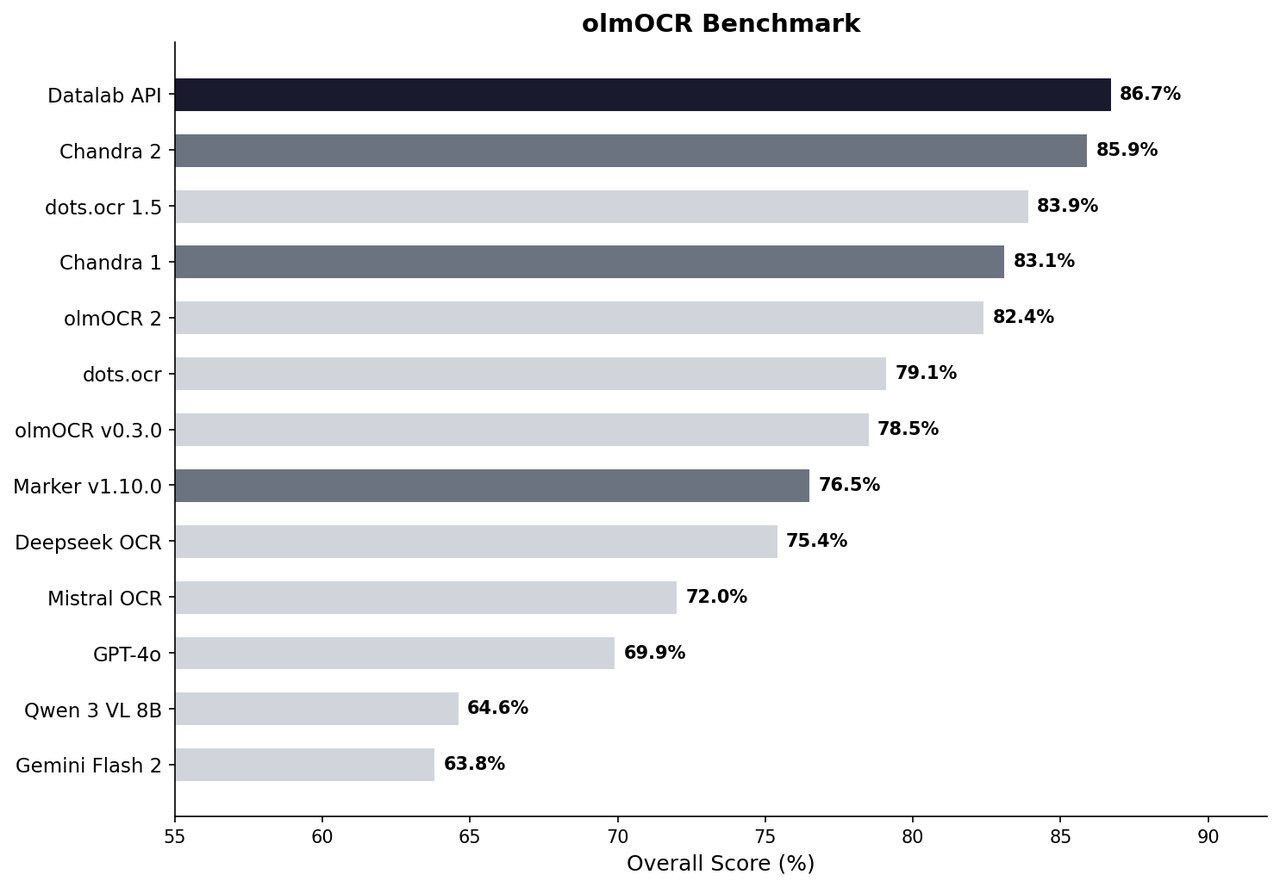
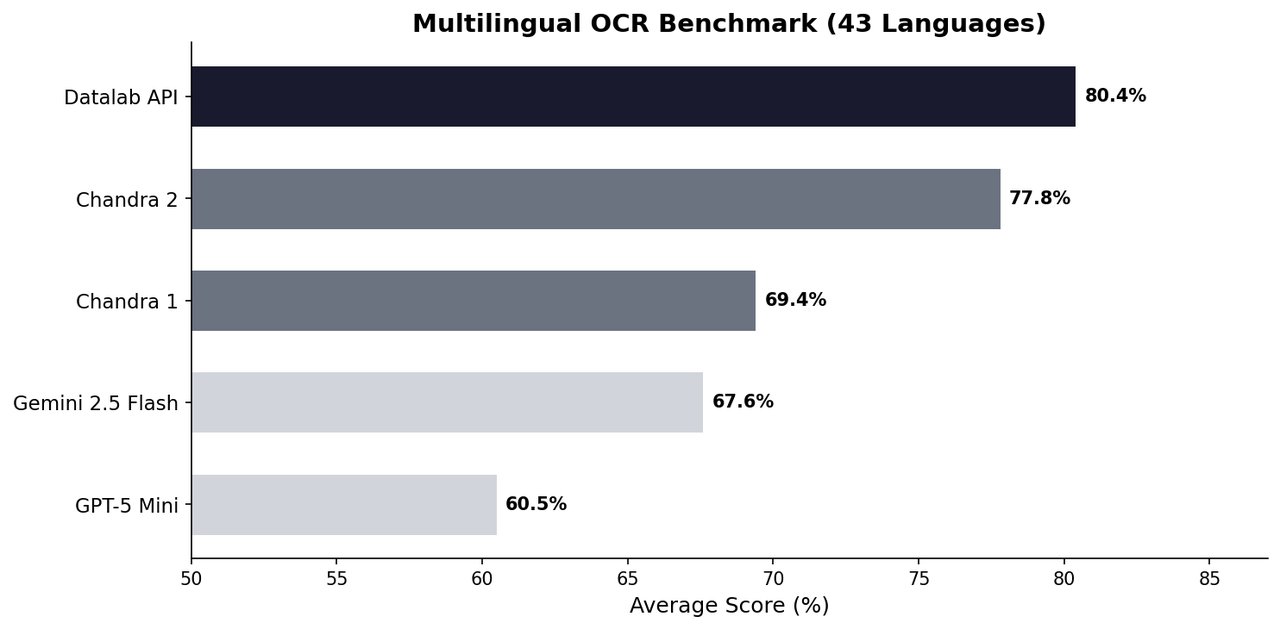
It beats GPT-5 Mini and Gemini at reading documents
The numbers tell the story. On a 43-language test, Chandra 2 scored 77.8% average accuracy. Google's Gemini 2.5 Flash scored 67.6%. OpenAI's GPT-5 Mini scored 60.5%. That's not a marginal lead — Chandra beats the big names by 10 to 17 percentage points.
On the expanded 90-language benchmark, the gap stayed wide: Chandra at 72.7% vs. Gemini at 60.8%.
Where Chandra 2 excels:
ArXiv papers — 90.2% accuracy on scientific documents
Tables — 89.9% accuracy on structured data
Handwritten math — 89.3% accuracy on old scans with equations
Forms with checkboxes — understands filled-in forms, lease agreements, registrations
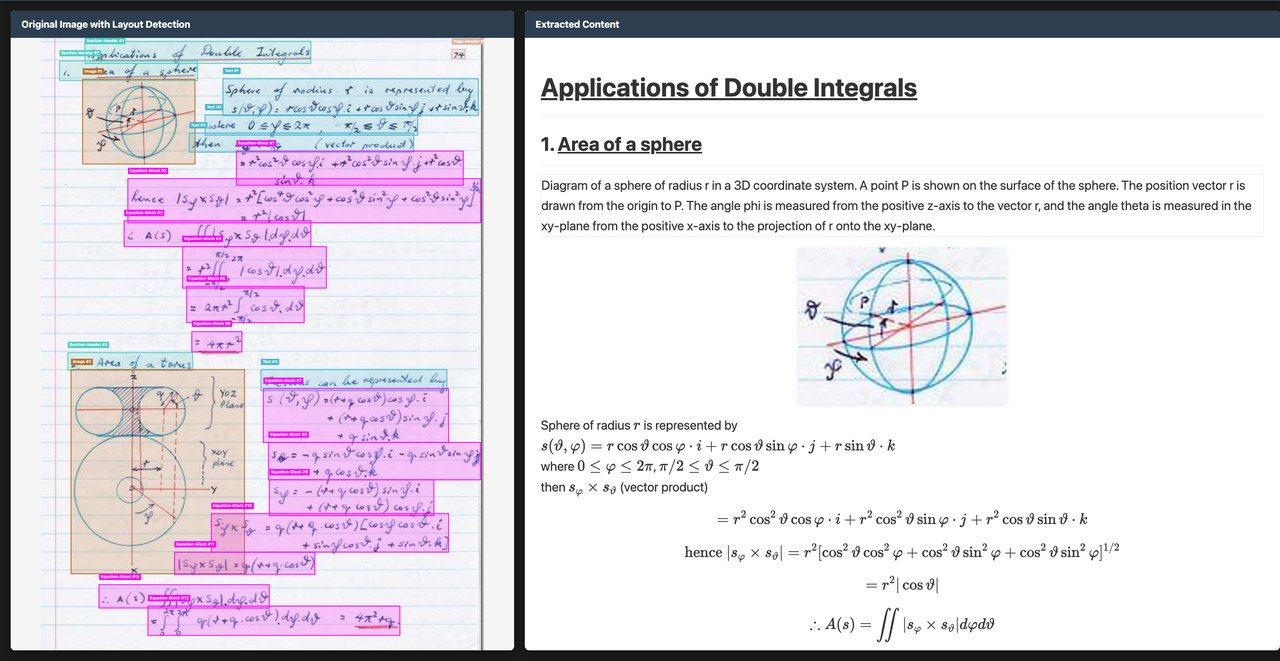
Not just text — it preserves the layout
Most OCR tools strip formatting. Chandra 2 keeps it. Multi-column layouts, headers, footers, table borders, nested cells — all preserved in the output. You get clean Markdown, HTML, or JSON that mirrors the original document's structure.
This matters for anyone who processes invoices, legal contracts, academic papers, or government forms. Instead of manually fixing garbled output, you get something you can immediately use.
Accountants, researchers, and admins — this is for you
If you process invoices or receipts, Chandra can extract structured data from scanned documents in seconds. If you work with academic papers, it handles math equations and scientific notation that other tools mangle. If you handle multilingual documents, the 90-language support means you don't need separate tools for each language.
The model processes about 2 pages per second on a modern GPU, or you can use Datalab's hosted API with a free tier for smaller workloads.
Try it now
Install locally in one line:
pip install chandra-ocr[all]Then scan a document:
chandra input.pdf ./output --method hfOr launch the visual web interface:
chandra_appNo GPU? Try the free online playground to test it instantly in your browser. The code is open-source on GitHub under Apache 2.0, free for personal use and startups under $2M revenue.
Related Content — Get Started with Easy Claude Code | Free Learning Guides | More AI News
Sources
Stay updated on AI news
Simple explanations of the latest AI developments