Mozilla just rebuilt Llamafile — now one file runs text, image, and speech AI
Llamafile 0.10 bundles text chat, image generation, and speech-to-text into a single executable. Download one file, double-click, run AI locally.
Mozilla just shipped the biggest update to Llamafile since the project launched — and it turns a single downloaded file into a private AI powerhouse that handles text conversations, image generation, and speech-to-text, all running on your own computer with zero cloud dependency.
Llamafile (23,800 GitHub stars) is Mozilla's answer to a simple question: why is running AI locally still so complicated? The tool packages an entire AI model into a single executable file that works across macOS, Windows, Linux, FreeBSD, and more — no Python, no Docker, no terminal wizardry required.
Three AI Engines in One File
Version 0.10 is a ground-up rebuild with a new build system that now bundles three separate AI capabilities:
Text chat (llama.cpp) — Converse with AI models like Qwen, DeepSeek, Gemma, and others. The updated llama.cpp engine supports the latest models released in 2026.
Speech-to-text (Whisper.cpp) — Transcribe audio and translate between languages, all offline. Now integrated as a built-in module rather than a separate download.
Image generation (Stable Diffusion) — Generate images from text prompts, running entirely on your machine. Also integrated as a built-in module.
Before this update, you needed separate tools for each of these. Now it's one download.
GPU Acceleration That Actually Works
Two major hardware improvements make version 0.10 dramatically more practical:
macOS Metal support now works automatically. If you have a Mac with Apple Silicon (M1, M2, M3, M4), Llamafile will use your GPU without any configuration. Previous versions required manual setup.
NVIDIA CUDA support is back. After being unavailable in recent versions, GPU acceleration for NVIDIA graphics cards has been restored. This means models that took minutes on CPU alone can now run in seconds.
Three Ways to Talk to AI
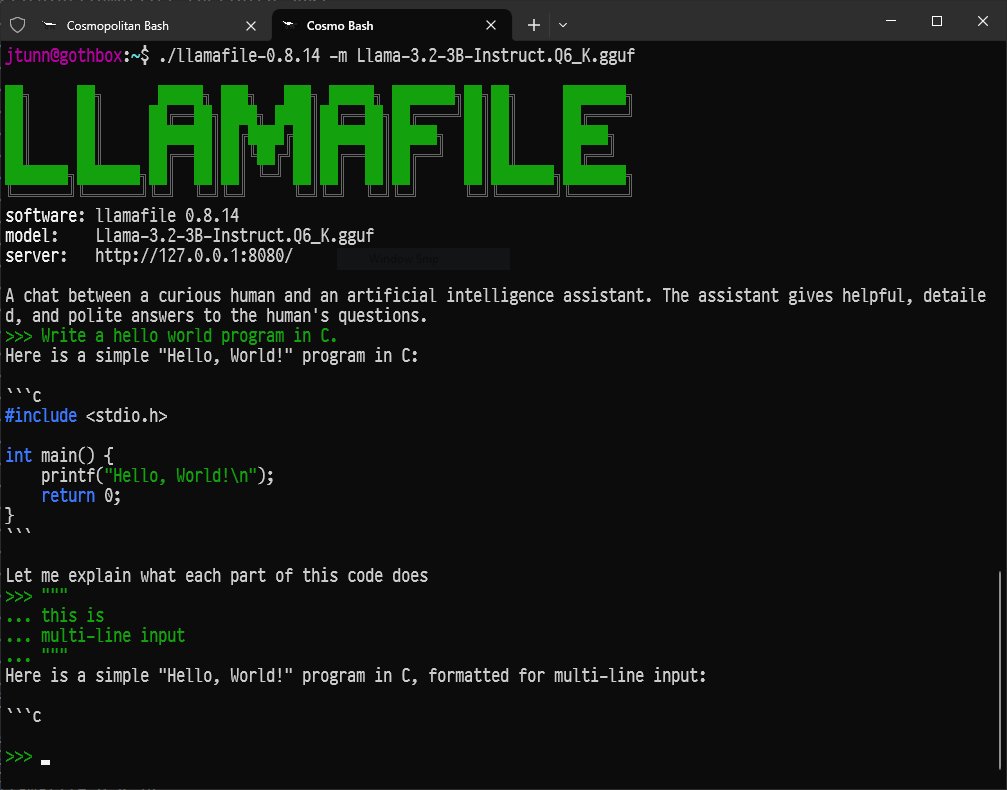
Version 0.10 introduces a hybrid chat/server mode — a colorful terminal interface (TUI) that lets you chat with the AI directly in your terminal while simultaneously running a web server for browser access. Plus a new CLI mode for one-shot questions:
# Download a small model (under 1 GB)
curl -LO https://huggingface.co/mozilla-ai/llamafile_0.10.0/resolve/main/Qwen3.5-0.8B-Q8_0.llamafile

# Make it executable
chmod +x Qwen3.5-0.8B-Q8_0.llamafile

# Run it — that's it
./Qwen3.5-0.8B-Q8_0.llamafile
Three commands. No installation. No accounts. No data leaving your machine.
Who Is This For?
Privacy-conscious professionals: Lawyers, doctors, accountants, and anyone handling sensitive data can now use AI without sending a single word to the cloud. Every conversation stays on your hard drive.
People in areas with poor internet: Llamafile works completely offline. Download the file once, and you have AI access forever — no subscription, no internet connection needed.
Curious beginners: If you've wanted to try running AI locally but were intimidated by Python environments and terminal commands, this is the simplest path. Download, double-click (on many systems), and start chatting.
Developers building local-first apps: The built-in server mode means you can point your applications at localhost:8080 and get an API compatible with existing AI tools — no external services required.
The Trade-offs
Mozilla is transparent that version 0.10 is a major architectural shift. The new build system aligns better with the latest llama.cpp releases (meaning faster support for new models), but some features from the 0.9.x series may not be available yet. If you rely on a specific feature, Mozilla recommends checking the release notes or sticking with 0.9.x until your workflow is fully supported.
The project runs under the Apache 2.0 license — free for personal and commercial use. Five contributors shipped this release, including three first-time contributors to the project.
Supported platforms: macOS, Windows, Linux, FreeBSD, OpenBSD, NetBSD
CPU architectures: AMD64 (Intel/AMD) and ARM64 (Apple Silicon, Raspberry Pi)
GPU acceleration: NVIDIA CUDA, Apple Metal (automatic)
License: Apache 2.0 (free)
The full project is on GitHub, and documentation lives at mozilla-ai.github.io/llamafile.
Related Content — Get Started with Easy Claude Code | Free Learning Guides | More AI News
Sources
Stay updated on AI news
Simple explanations of the latest AI developments