Atuin just added AI to your terminal — type English, get commands
Atuin v18.13 lets you describe what you want in plain English and get the exact terminal command. It flags dangerous operations before you run them.
Forgetting terminal commands is universal. Was it tar -xvf or tar -xzf? Does rm -rf need a path first? Atuin, an open-source shell history tool with 28,800 GitHub stars, just shipped version 18.13 — and its biggest new feature is an AI assistant built directly into your terminal.
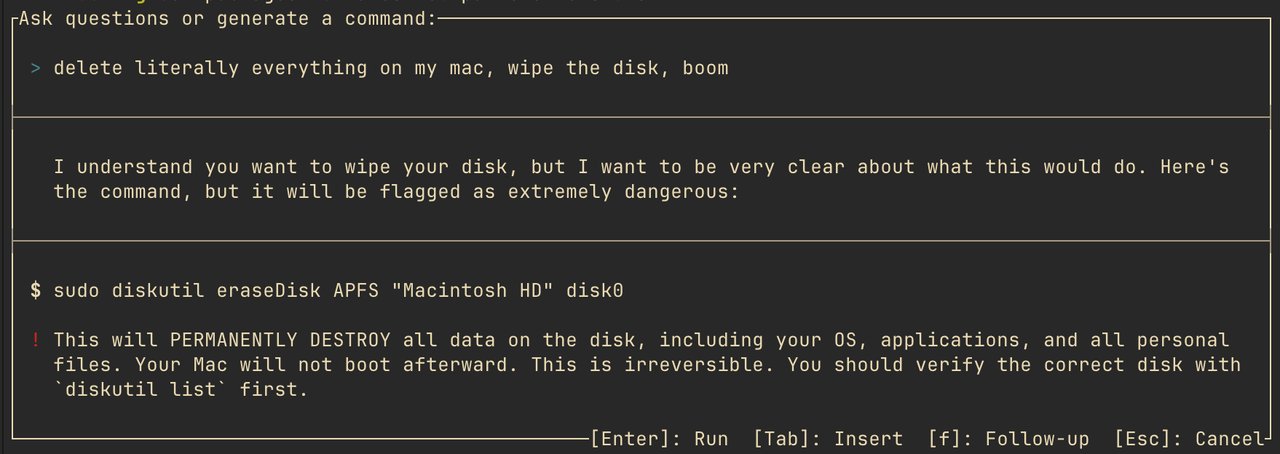
Press ? on an empty prompt, describe what you want in plain English, and Atuin generates the exact command. Press Enter to run it, or Tab to edit it first. Need a follow-up? Press f.
How the AI actually works
Atuin's AI isn't just sending your question to ChatGPT. It combines frontier language models (large AI systems like Claude or GPT) with data from man pages (the built-in documentation that comes with every terminal command) to generate accurate, context-aware suggestions.
Three principles guide the feature:
Accuracy — Commands are generated using real documentation, not just pattern matching. The AI cross-references man pages to ensure the flags and syntax actually exist.
Safety — Dangerous commands (like deleting files, deploying to production, or wiping data) trigger a double confirmation. The system uses both rule-based checks and AI-powered guardrails to catch risky operations before you accidentally nuke something.
Privacy — By default, the AI only knows your operating system and shell type. It doesn't see your files, directories, or git history unless you explicitly grant permission.
More than just AI — a complete shell upgrade
Version 18.13 packs two other major features beyond the AI assistant:
Lightning-fast search (Daemon mode): Atuin now keeps an in-memory search index running in the background, using a modified version of the algorithm behind fzf (a popular fuzzy search tool). This means searching through thousands of previous commands happens instantly — no waiting for database queries.
Hex PTY proxy: A lightweight terminal layer that lets Atuin's search popup appear over your existing terminal output without erasing it. When you close the popup, your previous work reappears exactly as you left it. Think of it as a mini picture-in-picture mode for your terminal.
Getting started in 2 minutes
Atuin works with zsh, bash, fish, nushell, xonsh, and PowerShell. Here's how to set it up:
# Install Atuin
curl --proto '=https' --tlsv1.2 -LsSf https://setup.atuin.sh | sh

# Import your existing shell history
atuin import auto

# Enable AI (add to config or run setup)
atuin setup

# Restart your shell and press ? on an empty prompt
Optional: create a free account to sync your shell history across machines with end-to-end encryption (encrypted on your device before it ever leaves):
atuin register -u YOUR_USERNAME -e YOUR_EMAIL
atuin sync
Who this is for
• Developers and sysadmins who forget obscure flags (everyone)
• Terminal beginners learning the command line — type English instead of memorizing syntax
• People using Claude Code or other AI coding tools who want the same "describe what you want" experience in their shell
• Anyone switching between machines who wants the same command history everywhere, encrypted
Atuin is free and open-source (MIT license). The hosted sync service offers free and paid tiers. You can also self-host the sync server if you prefer to keep everything on your own infrastructure.
Related Content — Get Started with Easy Claude Code | Free Learning Guides | More AI News
Stay updated on AI news
Simple explanations of the latest AI developments