Baidu just released an AI that reads documents better than Google — free
Qianfan-OCR scores #1 on document benchmarks, beating DeepSeek and Gemini. It reads 192 languages, handles charts and handwriting, and it's completely free.
Baidu just released Qianfan-OCR, a free AI model that reads documents, tables, charts, and handwriting better than Google's Gemini and DeepSeek — according to every major benchmark.
The model scored 93.12 on OmniDocBench (the standard test for document AI), beating DeepSeek-OCR-v2 at 91.09 and Gemini-3 Pro at 90.33. It reads 192 languages, runs on a single GPU, and is released under an open Apache 2.0 license — meaning anyone can use it for free.
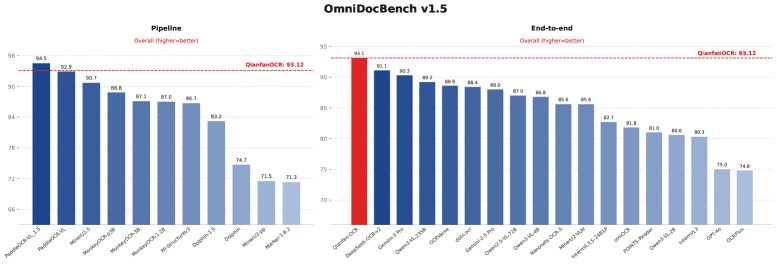
One AI replaces an entire document processing pipeline
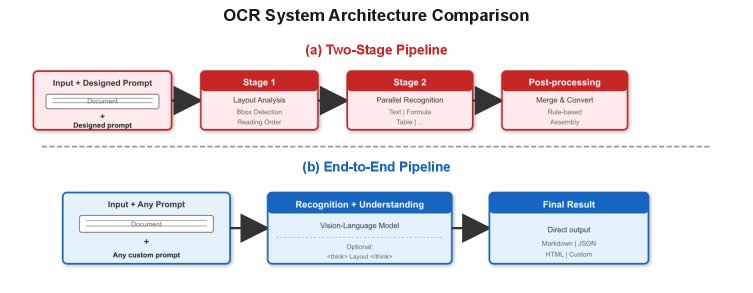
Traditional document scanning works like a factory assembly line: one tool finds the text, another identifies the layout, a third reads tables, a fourth handles formulas. If any step fails, the whole thing breaks.
Qianfan-OCR replaces all of that with a single model. You give it a photo of a document — a receipt, a contract, a handwritten note, a chart — and it converts everything to clean, structured Markdown text. No multiple tools. No complicated setup.
- Documents — contracts, invoices, receipts, medical records, ID cards
- Tables — complex layouts with merged cells, even rotated tables
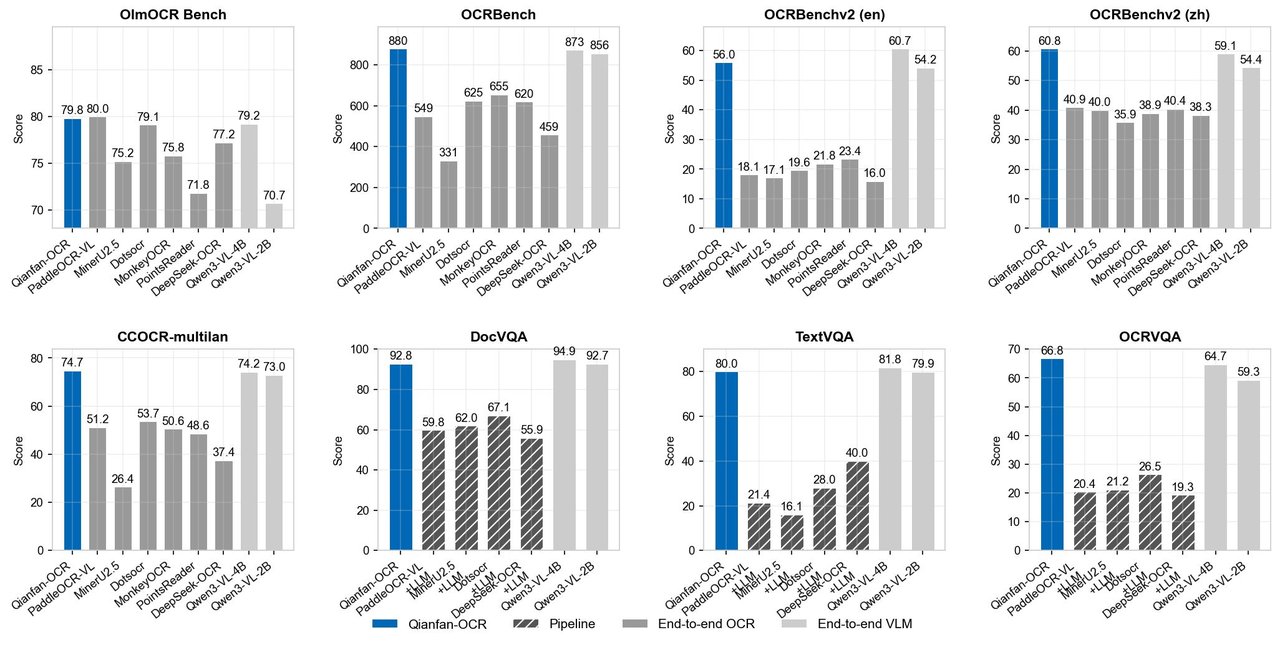
- Charts — bar graphs, pie charts, trend lines (scores 94.0 vs Qwen3's 81.8)
- Handwriting — Chinese and English handwritten text
- Formulas — math equations converted to LaTeX format
- Street signs and labels — text in natural scenes
The chart-reading breakthrough
The most striking result: chart understanding. Traditional OCR systems completely fail at reading charts because they lose the visual structure. On the CharXiv benchmark (a test for chart comprehension), Qianfan-OCR scored 94.0 — while the previous best scored just 81.8.
This means you can take a photo of a bar chart in a report and ask AI to extract the exact numbers, identify trends, or answer questions about the data. That's a task most document AI still can't do reliably.
A clever trick: letting AI see the layout first
Qianfan-OCR introduces a feature called "Layout-as-Thought" — an optional thinking mode where the AI first maps out the document's structure (where the headings are, where the tables start, what the reading order is) before actually reading the text.
Think of it like how you'd scan a newspaper page: you'd first notice the headline, the columns, the photos, and the captions — then start reading. The AI does the same thing, and it significantly improves accuracy on complex layouts.
Who should care about this
If you process receipts, invoices, or contracts daily — this model extracts structured data from photos in seconds. Point it at a stack of invoices and ask it to pull out dates, amounts, and vendor names as JSON.
If you work with multilingual documents — 192 languages across diverse scripts means you can handle documents in Arabic, Chinese, Hindi, Korean, or any combination.
If you're a developer building document tools — the model is small (4 billion parameters), runs on a single A100 GPU at over 1 page per second, and deploys with vLLM in one command.
Try it yourself
# Quick deployment with vLLM
vllm serve baidu/Qianfan-OCR --trust-remote-code

# Or try the live demo on Hugging Face
# https://huggingface.co/spaces/baidu/Qianfan-OCR-Demo
The bigger picture: document AI just got commoditized
Until now, the best document parsing tools were either expensive cloud services (Google Document AI, Amazon Textract) or required stitching together multiple open-source tools. Baidu just released a single, free model that beats all of them on standardized tests.
Combined with the full research paper and open-source code, this is the kind of release that makes paid document scanning services sweat. For the millions of businesses that still manually type data from paper forms into spreadsheets, this could be transformative.
Related Content — Get Started with Easy Claude Code | Free Learning Guides | More AI News
Stay updated on AI news
Simple explanations of the latest AI developments