Atomic just turned your notes into an AI brain
Atomic is a free, self-hosted knowledge base that uses AI to connect your notes, generate wiki articles, and answer questions — all without sending data to the cloud.
A new open-source tool called Atomic just hit version 1.0 — and it turns plain markdown notes into a semantically-connected, AI-powered knowledge graph. Think of it as Obsidian meets ChatGPT, but everything stays on your machine.
The project just reached 109 points on Hacker News as a Show HN launch, with developers praising its clean design and privacy-first approach. It's free, MIT-licensed, and works on macOS, Windows, Linux, and even iOS.
Your notes, connected by meaning
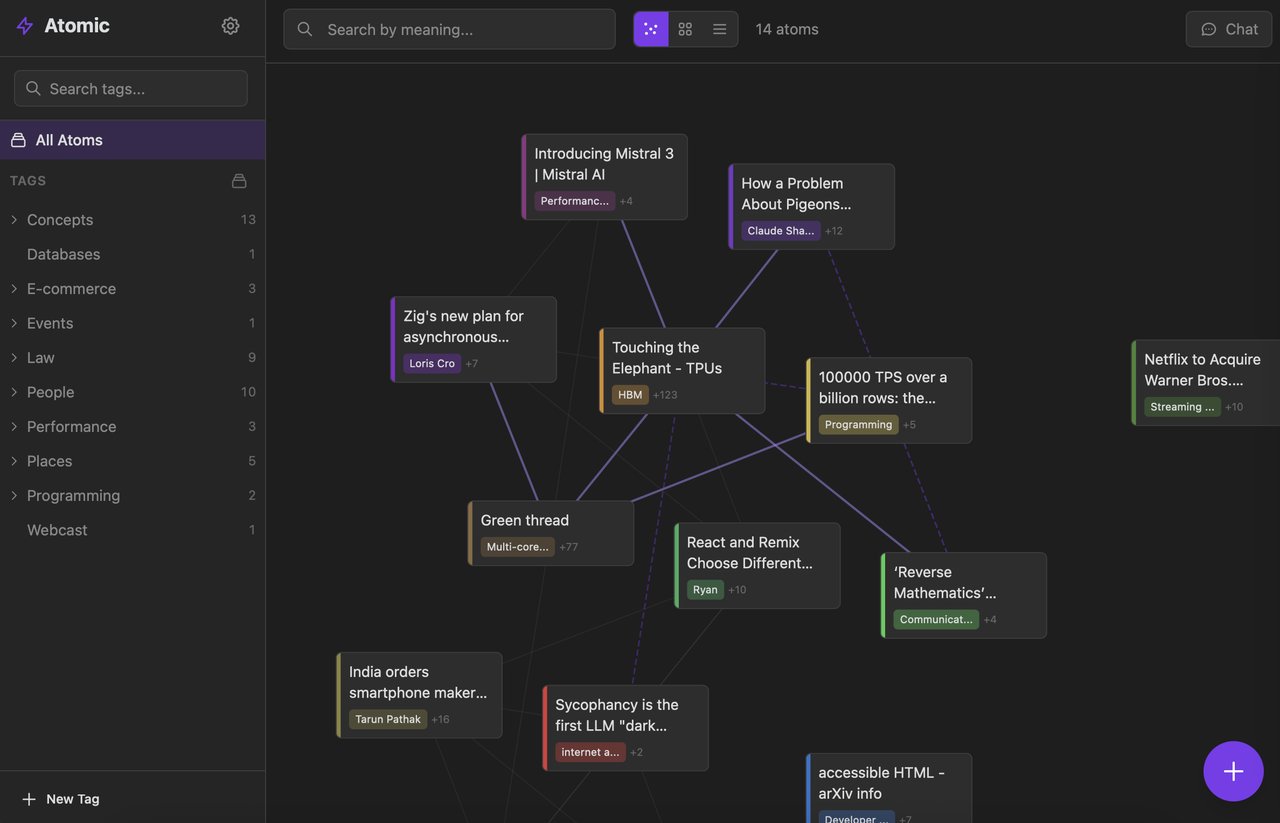
Atomic stores knowledge as "atoms" — markdown notes that are automatically broken into chunks, converted into numerical representations (embeddings), tagged, and linked by how similar they are in meaning. You don't manually link notes. The AI figures out which ideas relate to each other.
The result is a spatial canvas where your notes float and cluster based on semantic similarity. Notes about AI hardware naturally group together, separate from notes about programming patterns or business events. It's like watching your brain's filing system organize itself.
What Atomic does with your notes
Find notes by meaning, not just keywords. Search "machine learning hardware" and find your note about TPUs even if you never used those exact words.
Atomic writes encyclopedia-style articles by synthesizing your notes — complete with inline citations linking back to your original sources.
Ask questions in natural language and get answers pulled directly from your knowledge base — like having a research assistant who's read everything you've saved.
AI organizes your notes into hierarchical categories automatically. No more spending 10 minutes deciding where a note belongs.
AI-generated wiki articles from your own notes
One of Atomic's standout features is wiki synthesis. Point it at a tag — say, "AI" — and it generates a structured article pulling from every note you've saved on the topic. Each claim includes numbered citations that link back to the original atom.
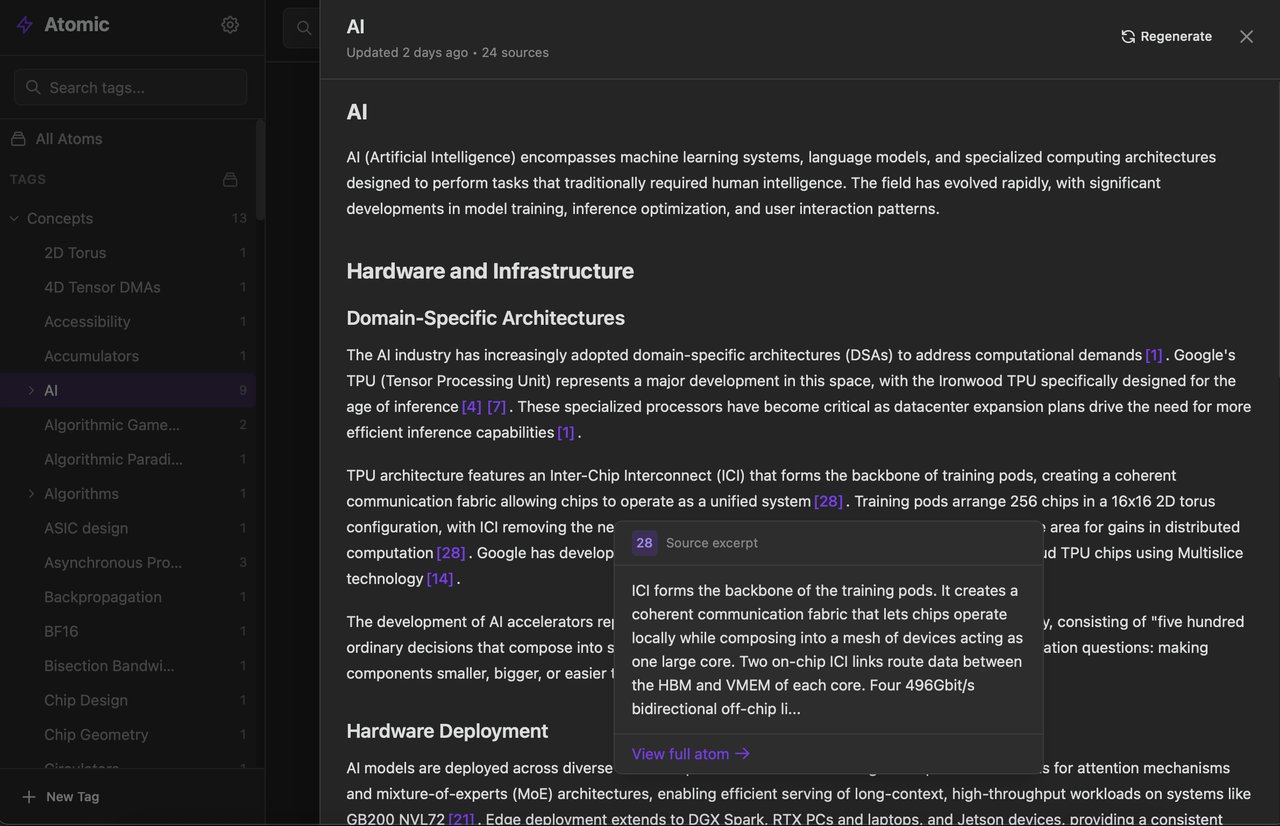
In the screenshot above, Atomic generated an article about AI hardware and infrastructure, with citations like [1], [7], [28] linking to specific notes. Click any citation to see the original source excerpt — a feature that makes fact-checking effortless.
Chat that actually searches your knowledge base
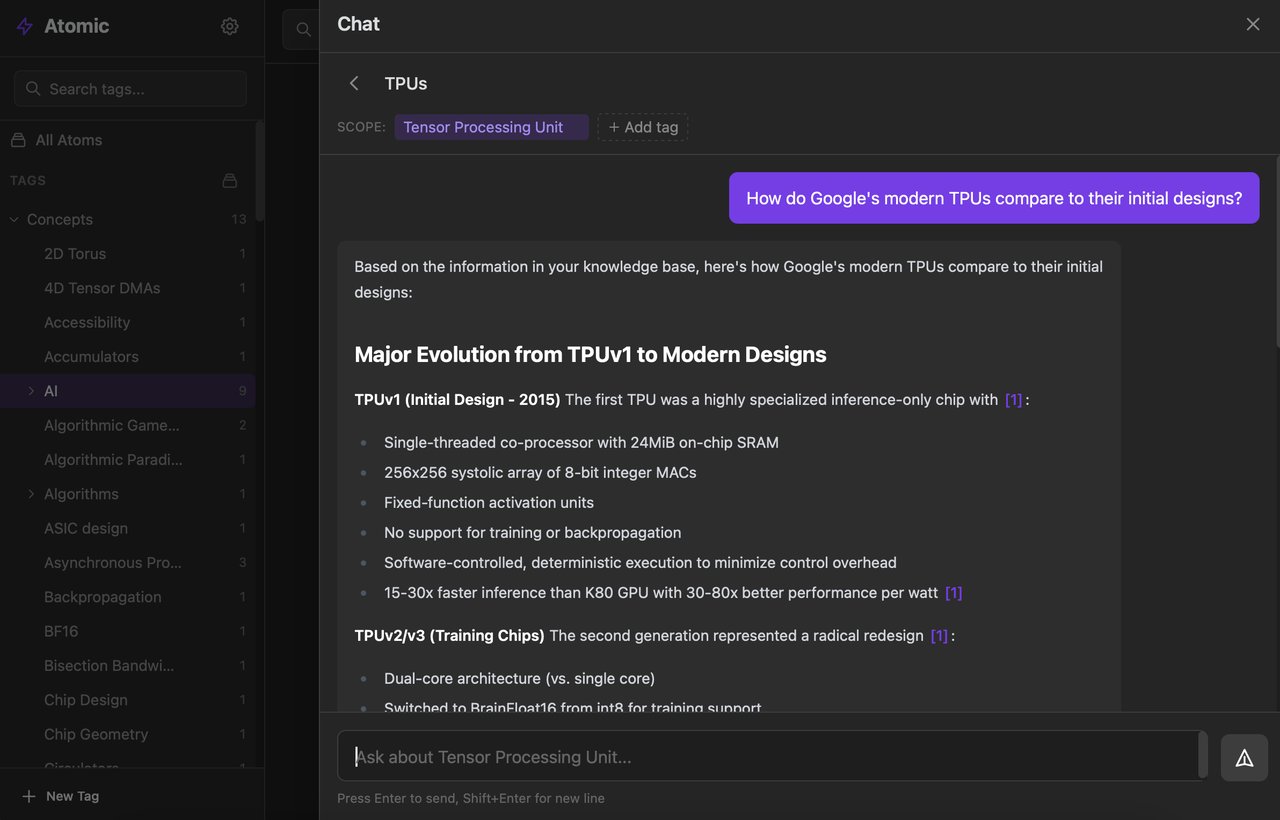
The chat interface isn't a generic AI chatbot. It's an agentic RAG system (a setup where the AI searches your personal database before answering, so responses are grounded in your own notes — not internet guesses).
You can scope conversations by tag. Ask "How do Google's modern TPUs compare to their initial designs?" within the AI tag, and it pulls relevant information exclusively from your saved notes about TPUs.
Privacy: cloud or fully local — your choice
Atomic supports two AI backends:
- OpenRouter — cloud-based, connects to models like Claude, GPT, and Gemini
- Ollama — runs AI models entirely on your machine. No data leaves your computer.
For anyone handling sensitive research, client notes, or personal journals, the Ollama option means true privacy. Your notes never touch a server.
Runs everywhere — including your phone
Atomic ships as a desktop app (built with Tauri, a lightweight alternative to Electron), a Docker container for self-hosting on a server, and a native iOS app built with SwiftUI. There's also a browser extension for clipping web content and an RSS feed syncer that automatically pulls in articles from your favorite sources.
For AI coding agent users: Atomic includes an MCP server (the protocol Claude Code and other AI tools use to connect to external data sources), so you can query your knowledge base directly from your AI coding workflow.
Get started in under 2 minutes
Option 1: Desktop app — Download from GitHub Releases for macOS, Linux, or Windows. The setup wizard walks you through AI provider configuration.
Option 2: Docker
git clone https://github.com/kenforthewin/atomic.git
cd atomic
docker compose up -d
Then open http://localhost in your browser.
The bigger picture
Atomic joins a growing wave of tools that let individuals build their own AI-powered "second brain" without relying on big tech platforms. Unlike Notion AI or Obsidian's paid AI plugins, Atomic is fully open-source (MIT license), self-hostable, and works with free local AI models.
The project is built in Rust (for speed) with a React frontend, and uses SQLite with sqlite-vec for vector search — meaning it's lightweight enough to run on modest hardware. The creator, Kenneth Bergquist, noted on Hacker News that he syncs top HN articles via RSS and generates wiki-style summaries organized by topic — essentially building a personal research library that grows smarter over time.
With 24 releases and a v1.0 milestone just reached on March 21, 2026, Atomic is actively developed and stabilizing fast.
Related Content — Get Started with Easy Claude Code | Free Learning Guides | More AI News
Stay updated on AI news
Simple explanations of the latest AI developments