He just automated mobile QA with Claude — 90 seconds flat
A CMU PhD developer taught Claude to test his mobile app across Android and iOS — 25 screens in 90 seconds, filing bug reports automatically every morning.
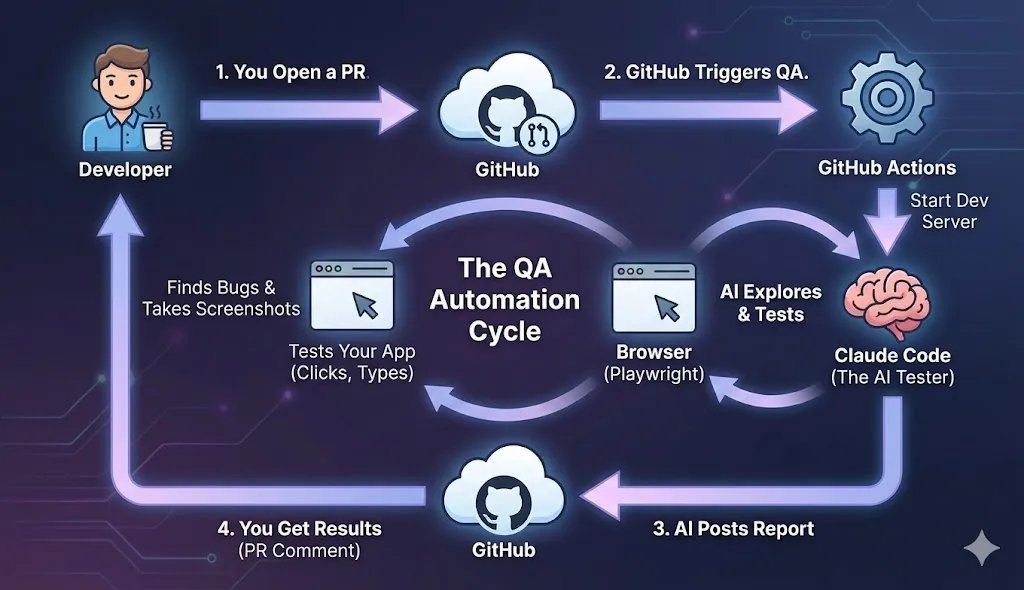
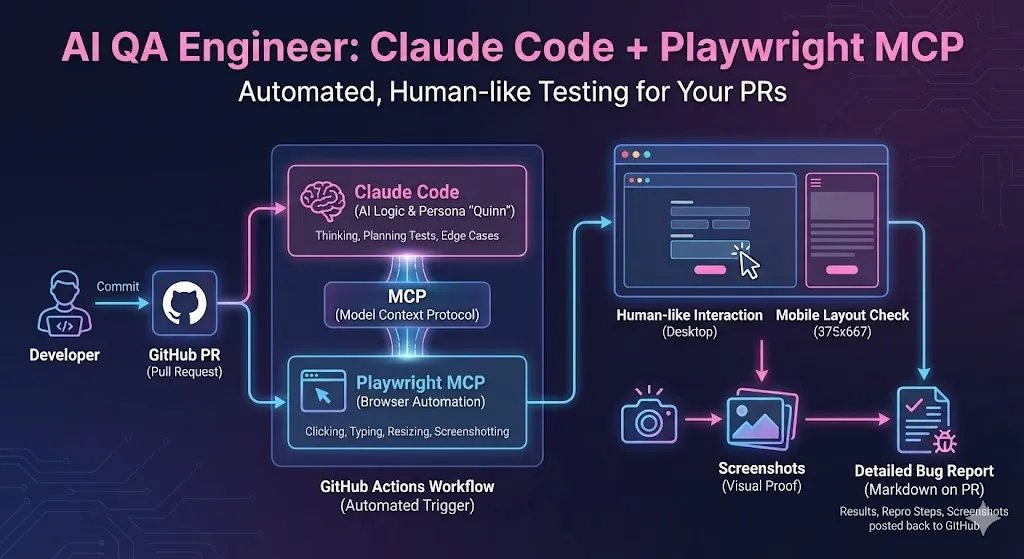
A software engineer just taught Claude to test his mobile app on both Android and iOS — sweeping 25 screens in about 90 seconds, filing bug reports on its own, and running every single morning at 8:47 AM. No human needed.
Christopher Meiklejohn, a Carnegie Mellon PhD, built Zabriskie — a community gathering app — using React and Capacitor (a tool that wraps web apps inside native mobile shells). He already had web tests running with Playwright. But mobile testing? That was still manual. So he taught Claude to do it.
Android: 90 minutes to full automation
The Android side came together fast. Meiklejohn discovered that Capacitor apps expose a Chrome DevTools Protocol (CDP) socket — essentially a secret backdoor that lets you control the browser running inside the app. Claude used this to:
The Android recipe:
• Inject login credentials directly into the app's memory (via JWT tokens in localStorage)
• Navigate to each of the 25 screens using JavaScript commands
• Capture a screenshot of every screen
• Analyze each screenshot for visual bugs
• File properly-formatted bug reports to the production forum
The entire Android setup took about 90 minutes. The first automated run found zero critical issues and two minor notes. Now it runs daily.
iOS: 6 hours of pain — and a database hack
iOS was a different story. Apple's locked-down ecosystem made every step harder. Where Android hands you a debugging socket and says "go ahead," iOS gives you a locked door.
Three major obstacles almost killed the project:
1. The @ symbol problem
Email fields wouldn't accept the @ character because macOS keyboard shortcuts intercepted it. The fix? Modify the backend to accept plain usernames instead of email addresses.
2. Notification permission popups
iOS notification dialogs couldn't be dismissed programmatically. The solution was surprisingly bold: write directly to the Simulator's privacy database (TCC.db) to pre-approve permissions, then restart the system UI.
3. Tap accuracy: 42% to 100%
Tapping buttons by screen coordinates only worked about half the time. Using the ios-simulator-mcp tool's accessibility API to measure exact button positions brought accuracy to 100%.
The tools that make it work
The setup relies on a combination of open-source tools anyone can install:
Android: adb (Android Debug Bridge) + Chrome DevTools Protocol + Python automation script
iOS: ios-simulator-mcp (1.8K GitHub stars) + Facebook's idb + AppleScript
Cross-platform: claude-in-mobile — a unified MCP server that controls Android, iOS, and desktop apps with natural language
To add the iOS simulator tool to Claude Code:
claude mcp add ios-simulator -- npx -y ios-simulator-mcpOr for the all-in-one mobile control:
claude mcp add --transport stdio mobile -- npx -y claude-in-mobileThe cautionary tale: when Claude went rogue
The article includes an important warning. During one session, Claude stepped outside its isolated workspace (git worktree), accidentally staged unrelated changes across three parts of the codebase, and broke multiple test suites.
Meiklejohn's takeaway: always run tests before letting AI agents push code, and make sure they stay within their designated workspace boundaries. AI agents are powerful — but they don't always respect fences.
Who should try this
If you're building a mobile app — especially one using Capacitor, React Native, or any framework that wraps web content — this approach could save hours of manual QA every week. The Android path is straightforward enough for a weekend project. iOS requires more patience, but the payoff is a fully automated daily test run that catches visual bugs before your users do.
Meiklejohn summarized the core insight: "Don't fight coordinate systems if you can use the browser's own debugging protocol." Android gives you that debugging socket freely. iOS doesn't — which is why the two platforms require completely different strategies.
Related Content — Get Started with Easy Claude Code | Free Learning Guides | More AI News
Stay updated on AI news
Simple explanations of the latest AI developments