Figma just let AI agents design on your canvas — for free
Figma's new MCP tool lets Claude Code, Cursor, and Copilot create real designs using your components. Free during beta — here's how to set it up.
Figma just opened the door that designers have been both dreaming about and dreading. Starting this week, AI agents can design directly on your Figma canvas — not just read your files, but actually create frames, place components, apply variables, and build layouts using your team's existing design system.
The new use_figma MCP tool (MCP stands for Model Context Protocol — think of it as a universal plug that connects AI tools to apps) works with Claude Code, Cursor, Codex, GitHub Copilot, and 10+ other coding tools. It's free during beta, with usage-based pricing coming later.
Not just another wireframe generator
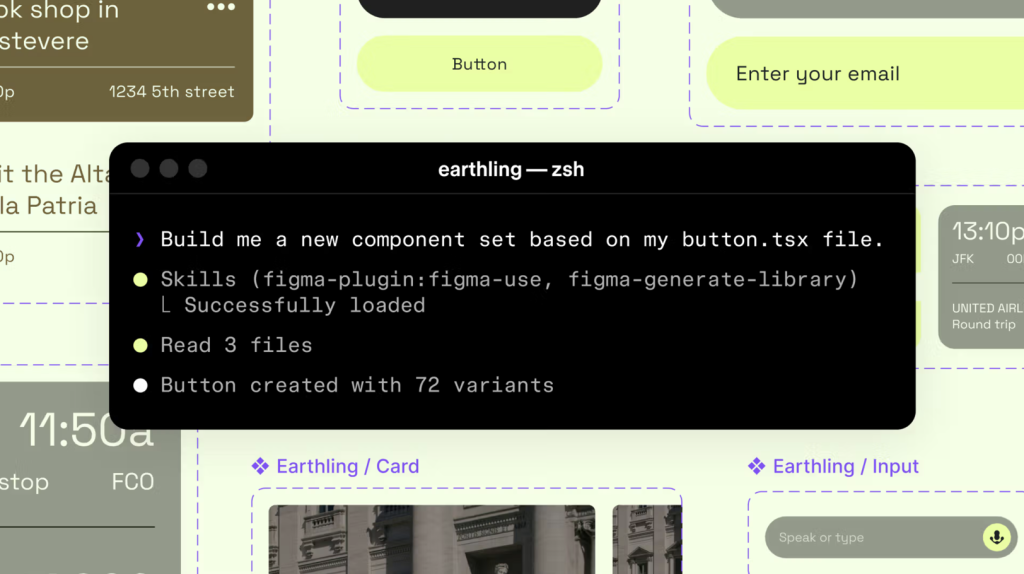
This isn't the generic AI that spits out cookie-cutter mockups. Figma's approach is fundamentally different: the agent plugs into your existing design system. It reads your color tokens, spacing rules, component libraries, and auto layout conventions — then builds with them.
Two tools power the system:
generate_figma_design — converts any live website or HTML into editable Figma layers. Point it at a competitor's page, and you get a fully deconstructed design file.
use_figma — creates or edits designs using your actual components and variables. The agent can even screenshot its own work and iterate on mistakes.
9 "Skills" that teach AI your team's rules
The real power is in Skills — markdown files that tell the agent how your team works. Think of them as instruction manuals for your AI designer. Figma launched 9 community-built skills at release:
• /figma-generate-library — builds component libraries from existing codebases
• /figma-generate-design — generates designs using your components and variables
• /apply-design-system — connects loose designs to system components (built by Edenspiekermann)
• /create-voice — generates screen reader accessibility specs from UI (built by Uber)
• /sync-figma-token — syncs design tokens between code and Figma with drift detection
• /multi-agent — runs parallel design workflows across multiple agents
Companies like Uber, Edenspiekermann, and Warp contributed skills at launch. Anyone can write custom skills for their team's specific conventions.
Who should care — and who should worry
If you're a designer: This doesn't replace you — it replaces the tedious part. Building 50 variants of a card component? The agent handles it in seconds. But your design system quality becomes critical: messy systems produce messy output.
If you're a developer: You can now generate Figma designs from code. Write a React component, and the agent turns it into a proper Figma layer — complete with your team's tokens and spacing.
If you're a product manager: Rapid prototyping just got absurdly fast. Describe a screen in plain English, and the agent builds it using your team's actual components — not generic wireframes.
Try it right now
The MCP server is available on all Figma plans during beta. To connect it with Claude Code:
claude mcp add figma -- npx figma-developer-mcp --figma-api-key=YOUR_KEYOr use the remote server directly — no local install needed. Connect to https://mcp.figma.com/mcp from any supported editor. Full setup guide is in Figma's MCP documentation.
Compatible with: Claude Code, Claude Desktop, Cursor, VS Code, Codex, Copilot CLI, GitHub Copilot, Windsurf, Warp, Augment, Factory, Firebender, Kiro, Replit, and more.
The bigger picture
This makes Figma the first major design tool to fully open its canvas to AI agents. The canvas isn't a static deliverable anymore — it's a live workspace where humans and AI collaborate in real time.
The catch? Your design system has to be good. Teams with well-organized component libraries and consistent tokens will get spectacular results. Teams with messy files will get messy AI output. In other words: the quality of your system determines the quality of your AI designer.
Related Content — Get Started with Easy Claude Code | Free Learning Guides | More AI News
Stay updated on AI news
Simple explanations of the latest AI developments