AWS Automates AI Chatbot Testing — No Humans Needed
AWS ActorSimulator auto-tests AI agents with realistic fake users in multi-turn conversations — no manual QA. Free, open-source, and production-ready.
Testing an AI chatbot used to mean hiring real people to play the role of confused customers — across every scenario your agent might encounter, over and over. AWS just changed that with ActorSimulator, a new component of its open-source Strands Evaluation SDK. It generates realistic, goal-driven simulated users that converse with your AI agent automatically — and score whether the conversation actually worked.
The timing matters. As companies deploy AI agents for customer service, travel booking, and technical support, teams are discovering a painful truth: agents often pass simple one-question tests but collapse the moment a real user asks "But what about...?" This release represents AWS's direct answer to the hardest unsolved problem in AI deployment — testing conversations that don't follow a script.
Why AI Chatbot Testing Breaks After the First Message
Evaluating a single AI response is straightforward: give the model an input, read its output, score it. That's called single-turn evaluation (one message in, one message out, one grade). Most AI testing tools are built for exactly this pattern.
But real conversations don't work this way. As AWS's research team put it: "Real users engage in exchanges that unfold over multiple turns. They ask follow-up questions when answers are incomplete, change direction when new information surfaces, and express frustration when their needs go unmet." Each message in a conversation depends entirely on what came before — which makes pre-written test scripts (called static datasets, i.e., fixed lists of expected Q&A pairs) fundamentally inadequate.
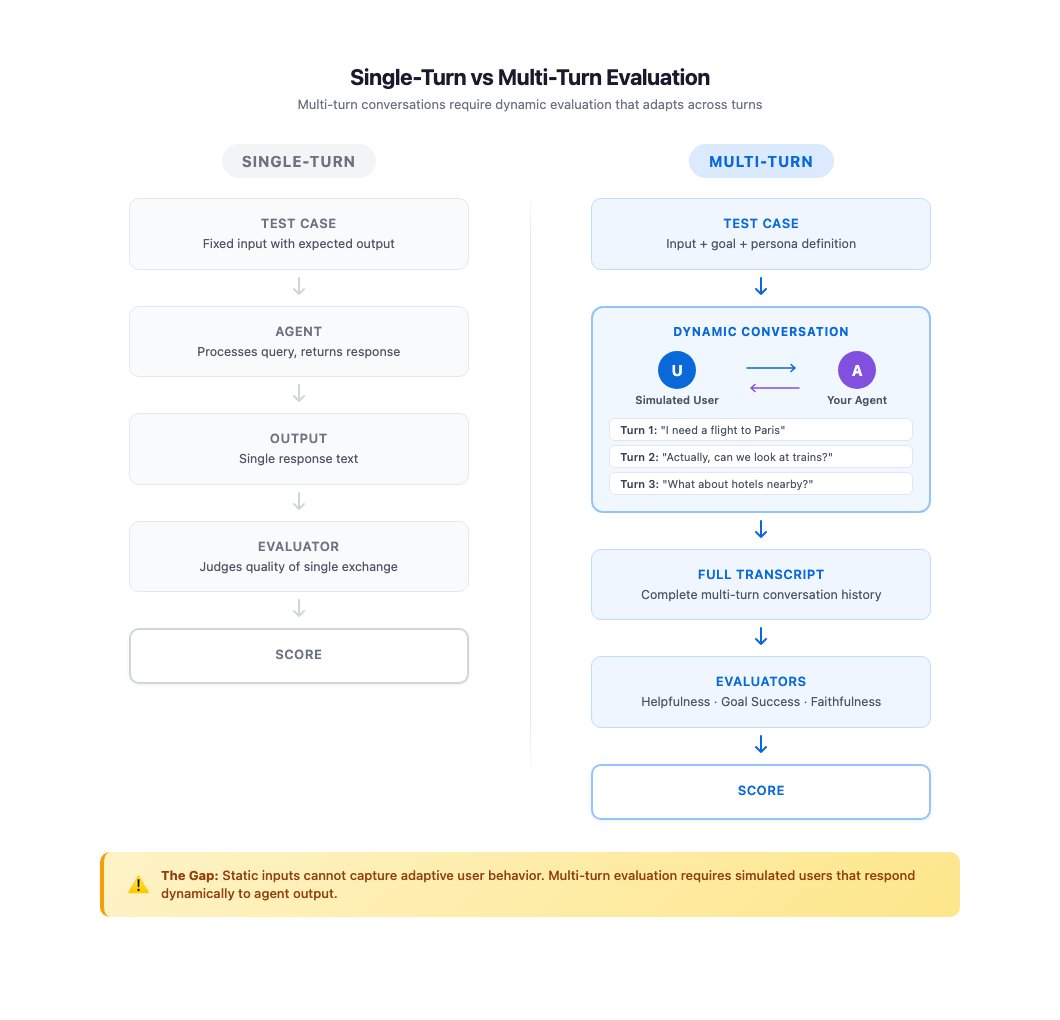
The scale problem compounds quickly. A travel assistant might have 50 different user scenarios — beginner travelers, business travelers, frustrated customers, budget shoppers. Testing each across 5-turn conversations means 250+ individual exchanges to cover just one category. Add agent version updates, and the number grows combinatorially (meaning it multiplies with each feature added — not just linearly).
The three approaches teams currently use each have fatal flaws:
- Manual testing: Realistic but unsustainable — testers can't re-run hundreds of sessions every time the agent changes
- Scripted test flows: Scalable but brittle — fixed scripts can't adapt to what the agent actually said in its last turn
- Ad-hoc prompt engineering (writing instructions to an AI to simulate users): Fast to set up, but produces inconsistent results — the simulated user behaves differently each run, making regression testing (checking whether a new update broke something that worked before) unreliable
How ActorSimulator Builds Fake Users That Feel Real
ActorSimulator introduces a fourth approach: structured user simulation — combining persona consistency, goal-driven behavior, and adaptive responses into a single automated pipeline. Here's what happens under the hood:
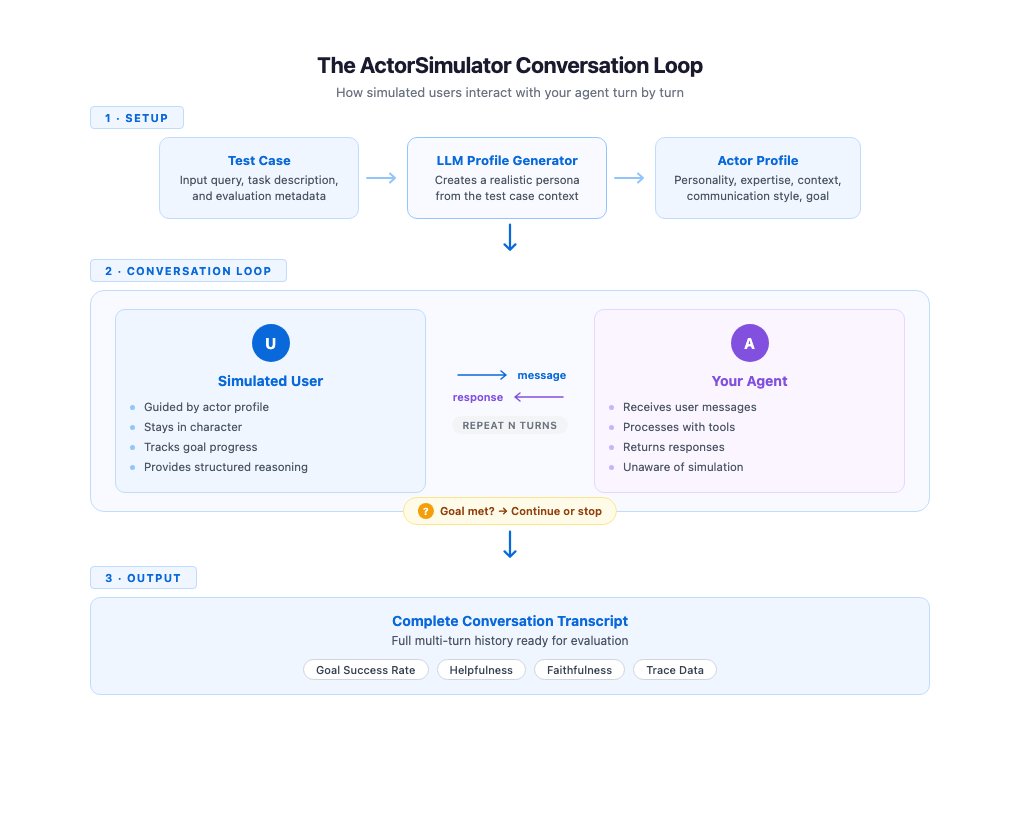
- Persona generation: ActorSimulator uses an LLM (a large language model — the AI engine behind tools like ChatGPT or Claude) to create a detailed actor profile from your test case. Example: "budget-conscious traveler with beginner-level experience who needs to book a flight under $300."
- Context-aware responses: Every simulated user message is generated with full access to the conversation history. The fake user responds to what the agent just said — not to a fixed script — so behavior adapts naturally to the agent's actual output.
- Structured reasoning traces: Each response includes an internal log explaining why the user sent that specific message. For example: "I'm confused about the layover time, so I'm asking for clarification" — giving evaluators insight into simulated intent.
- Goal completion assessment: Simulated users invoke a built-in tool to periodically check whether their original objective has been met. When satisfied, the conversation ends. When not, they push back with relevant follow-ups.
Conversations terminate under three conditions: goal satisfaction is reached, the agent proves unable to complete the request, or the maximum turn count (typically 3–5 turns, set by you) is exceeded.
The key innovation is what AWS calls persona consistency. Without it, a simulated user might behave like a "technical expert in one turn and a confused novice in the next" — exactly the drift problem that makes basic prompt-based simulators useless for reliable regression testing. Structured simulation ensures the same communication style, expertise level, and personality traits carry through every message in the session.
What Running an AI Chatbot Test Actually Looks Like
Setup starts with a single pip install (the Python command for installing software packages):
pip install strands-agents-evalsA typical evaluation run for a travel assistant agent looks like this:
from strands_evals import ActorSimulator, evaluate

# Define test case: persona, goal, turn limit
test_case = {
    "persona": "budget-conscious traveler, beginner experience",
    "goal": "Book a round-trip flight to Paris under $400",
    "max_turns": 5
}

# Run simulation against your agent
result = evaluate(
    agent=travel_assistant_agent,
    test_case=test_case,
    simulator=ActorSimulator()
)

print(result.goal_achieved)     # True or False
print(result.turns_used)        # How many messages it took
print(result.reasoning_trace)   # Why the user said each thing
The framework also ships with 3 pre-built evaluators (ready-made scoring tools) — for helpfulness (did the agent actually help?), faithfulness (did it stick to facts?), and tool selection (did it use the right internal functions?) — without requiring any custom metric engineering.
Connecting AI Agent Tests to Production Monitoring Pipelines
ActorSimulator integrates with OpenTelemetry (an industry-standard system for collecting performance data from software), which means evaluation results flow directly into the same dashboards engineering teams use to monitor live systems.
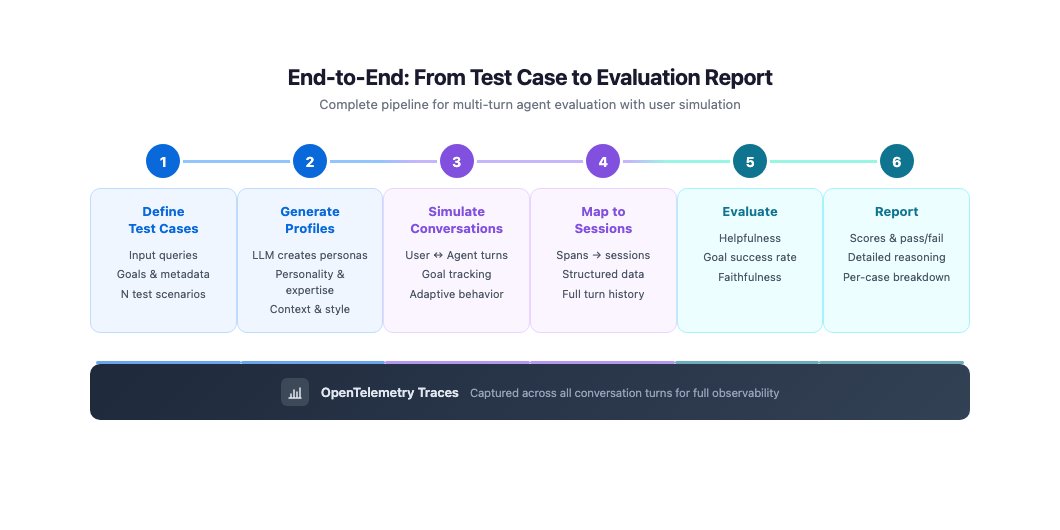
Session mapping features automatically organize multi-turn conversation traces (detailed logs of what was said and when) into structured evaluation sessions. Run 100 simulated conversations, and you can review results grouped by persona type, goal category, or success rate — instead of manually sorting through raw log files.
AI Evaluation Just Became Infrastructure
This release reflects an industry shift. Early AI teams asked "Does the model work?" Teams deploying production agents are now asking "Does the agent reliably serve customers in real, messy, multi-turn conversations?" Those are fundamentally different questions — and they require fundamentally different tooling.
The analogy AWS uses is instructive: ActorSimulator applies simulation principles from flight simulators and game engine testing to conversational AI. Just as pilots train in simulated cockpits before handling real aircraft, AI agents can now be stress-tested against simulated users before facing real customers — at scale, automatically, and repeatably.
For teams deploying customer service bots, support agents, or onboarding assistants, the practical impact is immediate: you can now catch the failure mode that kills customer satisfaction — the multi-turn breakdown — before it ships. If you're building or evaluating conversational AI tools, check out our AI automation guides for a deeper look at evaluation best practices, or get started with the setup guide today.
Related Content — Get Started | Guides | More News
Stay updated on AI news
Simple explanations of the latest AI developments