CSS Studio: AI Agent Turns Designs Into Code — $99 Once
CSS Studio AI agent converts visual edits into production code. $99 one-time, no subscription. Supports React, Vue, Tailwind. Built by the Motion team.
Most design tools end at export. CSS Studio ends at deployed code. The team behind Motion — the JavaScript animation library powering smooth UI on millions of websites — just launched a browser-based editor where you adjust colors, layouts, and animations visually, and a local AI agent (a small program running on your machine that reads your files and writes changes automatically) turns every click into production-ready code — a practical example of AI automation that fits directly into your existing development workflow. It landed on Hacker News with 106 upvotes and 76 comments within 7 hours. The price: $99 once, no subscription required.
The Design-to-Code Gap That Costs Teams Real Money
The standard design handoff cycle is expensive. A designer finishes a component in Figma, exports specs, sends them to a developer, waits 2–3 days, reviews the output, spots 6 visual inconsistencies, and cycles back. Subscription-based tools like Webflow ($23–$85/month) and Framer ($20–$85/month) tried to solve this — but they introduce proprietary runtimes that don't match your actual codebase, and add another recurring line item to your SaaS (Software as a Service — subscription software) budget.
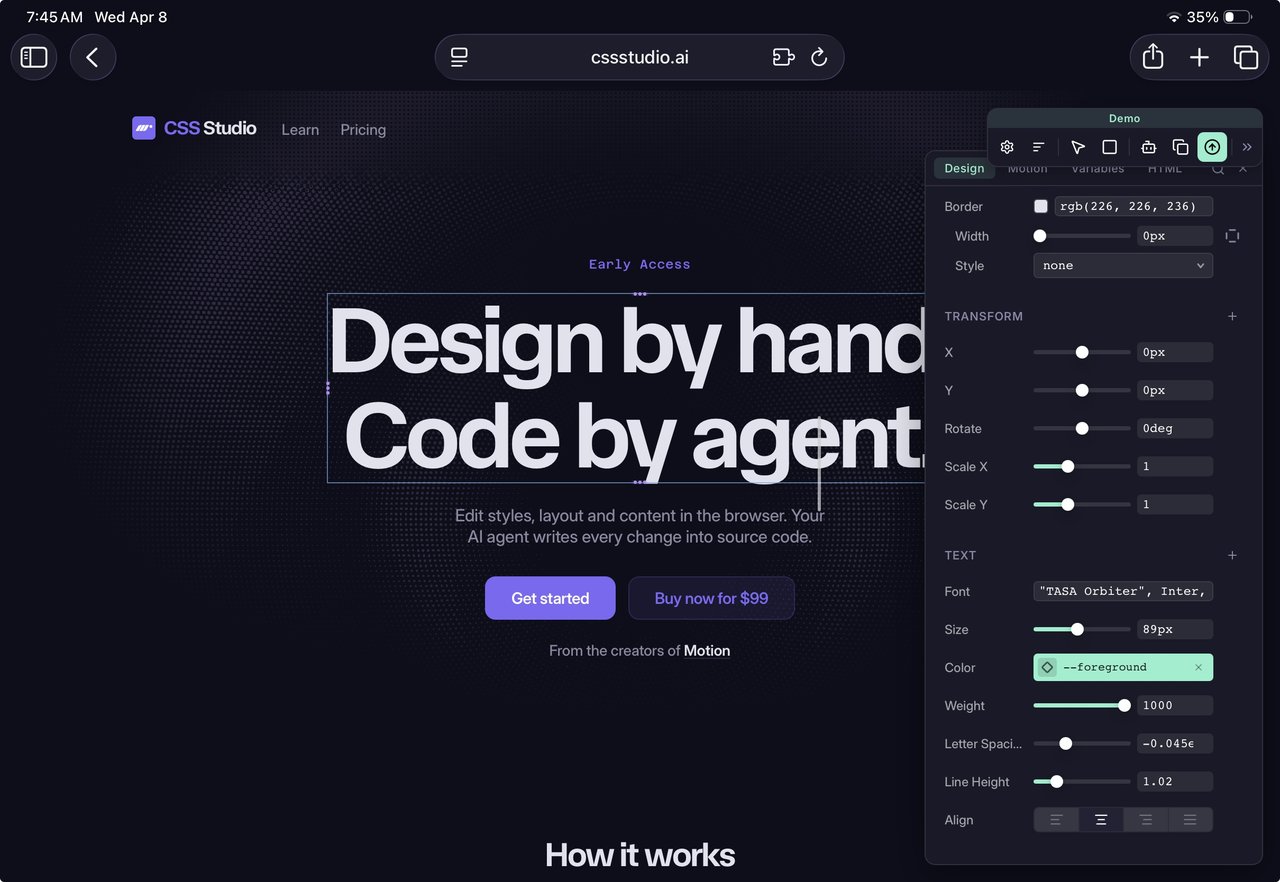
CSS Studio works differently. It sits on top of your existing tech stack. Your React or Vue components stay exactly as they are. CSS Studio adds an on-page visual panel and a local AI agent that writes changes back into your real source files — not into a custom format you need to export from.

Three Steps From Visual Click to Committed Code
The CSS Studio workflow has three stages that happen in near-real-time:
- Make a visual change. Drag a color slider, pick a font size, scrub a keyframe (an individual frame in a CSS animation that defines how an element looks at that exact moment). Everything happens live on the actual page — no previews, no simulation.
- The local agent finds your file. A process running on your own machine (not in the cloud — your source code never leaves your computer) locates the exact CSS or component file responsible for the element you just edited. It understands React component structure, Vue single-file components, and Tailwind utility classes.
- You review a diff and commit. A diff (a side-by-side view showing exactly which lines of code changed) appears before anything is saved. You approve it, commit to version control (Git — the industry-standard system for tracking code history), and deploy. The agent is built on Anthropic's Claude Agent SDK (the underlying AI system that powers context-aware code generation and tools like Claude Code), which is why it understands file structure rather than dumping generic CSS output.
This is what the team calls the "human-in-the-loop" model — you make every creative decision, the AI handles the mechanical implementation. No change merges invisibly. You retain full visibility and control at every step.
Every Tool in the Visual Editor
CSS Studio isn't a basic color picker bolted onto an AI wrapper. Here's the full toolkit that ships with it:
- Animation Timeline — scrub through CSS keyframe animations frame by frame, add or move keyframes, and adjust duration, delay, direction, and easing curves (the mathematical functions that control how fast or slow an animation moves through its arc)
- Spring Easings Editor — built on Motion's own spring physics system for natural-feeling CSS animations that mimic real-world inertia rather than mechanical linear curves
- Gradient Editor — handles all three CSS gradient types: linear (straight color transitions), radial (circular glow effects), and conic (pie-chart-style color fans), with movable color stops
- CSS Variables Panel — auto-detects all CSS custom properties (reusable design tokens like
--primary-color: #3e6ae1) on any element and propagates site-wide changes in one action - DOM Editing Tools — add, reorder, duplicate, or delete HTML elements; double-click any text to edit it inline without opening a code editor
- Typography and Layout Controls — full control over fonts, spacing, transforms, and responsive layout properties
Framework support covers four widely-used frontend environments: React (used by an estimated 8.8 million developers globally), Vue, plain HTML, and Tailwind CSS (the utility-first styling library with roughly 3.5 million active users). Browser support covers Chrome, Safari, and Firefox.
Built by the Motion Team — That Lineage Matters
CSS Studio comes from the team behind Motion (formerly Framer Motion), the open-source JavaScript animation library that ships inside a significant share of React applications across the web. That background explains why the Spring Easings Editor and Animation Timeline are centerpiece features rather than afterthoughts — animators built this design tool, not the other way around.
The product launched on Hacker News as a "Show HN" (a community post where builders showcase what they built themselves, rather than press coverage). The developer response: 106 upvotes and 76 comments within 7 hours of posting. A comment-to-upvote ratio of roughly 72% is well above average for design tool announcements on the platform, signaling that developers wanted to interrogate the details rather than simply acknowledge the launch.
How It Differs From Figma's Make Tool
Several HN commenters compared CSS Studio to Figma's Make tool (Figma's own AI feature for generating UI). SirHound clarified the difference clearly: Figma Make generates layouts from scratch; CSS Studio is for refining and iterating on designs you already built. It has no blank-canvas mode. It's a precision instrument, not a generative one — closer to browser devtools with an AI writing hand than to a design-from-scratch assistant. This makes it a natural fit for vibe coding workflows, where teams iterate rapidly on aesthetics and visual feel without writing CSS from specification documents.
One additional capability that's easy to miss: CSS Studio includes a chat interface built directly into the editor panel, so you can describe a change in plain language ("make the hero section padding match the card spacing") and let the agent interpret and apply it, instead of hunting for the right slider. This bridges the gap between fully manual editing and fully automated generation.
The Code Quality Question
The predictable concern with AI-generated code is maintainability — does the agent produce clean, readable, version-control-friendly output, or does it generate unreadable lines that become technical debt (code that works now but creates problems when someone has to maintain it later)? CSS Studio's mandatory diff-review model directly addresses this: every line the agent writes is visible to you before acceptance. Nothing goes into your repository without your explicit approval. SirHound confirmed a proper diff view before committing is on the roadmap as a first-class feature.
$99 Once vs. Your Monthly Subscription Stack
CSS Studio is in early access at a one-time price of $99 — all future updates included, no recurring charges. Compare that to the subscription alternatives it competes with:
- Webflow: $23–$85/month (ongoing subscription)
- Framer: $20–$85/month (ongoing subscription)
- Frontend developer rate for design implementation: $75–$200/hour
At $99 one-time against a $23/month Webflow subscription, the breakeven point is under 5 months. For a small frontend team handling 10 or more design iteration cycles weekly, the math is straightforward. Payments are processed via Paddle (an international payment platform that handles regional VAT and local taxes automatically), making CSS Studio accessible globally with local currency support.
Try It Before Your Next Design Review
If your current workflow involves manually re-implementing visual changes after every design review — or you're paying monthly for a tool that locks your output into its own ecosystem — CSS Studio is worth 30 minutes on a real component. Early access is open now at cssstudio.ai. Because it integrates directly with your existing Git-based project (a project that tracks code history with version control), there's no migration week, no new runtime to deploy, and no format lock-in. Try it on one component and see whether the agent's output meets your code quality standards before committing further.
For more on AI tools that slot into your existing workflow without replacing it, explore our AI automation guides or browse the latest tool coverage.
Related Content — Get Started | Guides | More News
Sources
Stay updated on AI news
Simple explanations of the latest AI developments