Google Gemma 4 Free Audio Transcription on Apple Silicon
Run Google Gemma 4 audio transcription locally on your Mac — no API key, no cloud fees. Plus: SQLite 3.53.0 ALTER TABLE fix and Meta AI's 16-tool stack.
Simon Willison — a full-stack developer and co-creator of Django — ran a 14-second audio clip through Google's Gemma 4 E2B model on his Mac and got back near-perfect transcription. No API key. No monthly bill. The 10.28 GB model ran entirely on Apple Silicon via MLX (Apple's open-source framework for running AI models locally on M-series chips), with zero cloud dependency. If you're still paying per-minute for audio transcription APIs, that math just changed.
Gemma 4 E2B: The 10 GB Local AI Model That Replaced Your Cloud Bill
Google's Gemma 4 E2B — the "E2B" denotes a 2-billion-parameter efficient variant tuned for multimodal tasks including audio — is among the first open-weight models capable of audio understanding that runs comfortably on consumer Mac hardware. The key enabler is mlx-vlm, a library that converts models into Apple's MLX format for fast local inference (running AI calculations directly on your device rather than sending data to a remote server).
The practical result: developers can now run audio transcription pipelines on their own machines without touching the OpenAI Whisper API (which charges per minute of audio processed) or any other paid service. A single M1 MacBook Pro is sufficient hardware to run the full pipeline. The tip came from Rahim Nathwani, who pointed Willison toward the MLX audio inference capability.
Accuracy on Willison's 14-second WAV test file was encouraging but not flawless — "front" came back as "right," and "how well that works" became "how that works." Those are minor phonetic confusions, not structural failures. For a local model requiring zero subscription setup, that accuracy is competitive with what cloud-based services delivered a few years ago at $0.006 per minute.

Run Gemma 4 Audio Transcription on Mac: 1 Command, 4 Packages
The installation is surprisingly streamlined. You need uv (a fast Python package manager — think pip, but 10–100x quicker for dependency resolution), Python 3.13, and this single terminal command:
uv run --python 3.13 --with mlx_vlm --with torchvision --with gradio \
mlx_vlm.generate \
--model google/gemma-4-e2b-it \
--audio file.wav \
--prompt "Transcribe this audio" \
--max-tokens 500 \
--temperature 1.0
Four packages handle everything: mlx_vlm (the model runner and inference engine), torchvision (image and tensor processing utilities), gradio (optional browser-based interface for a friendlier UI), and the 10.28 GB Gemma 4 E2B model itself — downloaded automatically from Hugging Face on first run.
Three parameters worth understanding before you start:
- --max-tokens 500 — the maximum words (roughly) the model can output; a 14-second clip uses well under this limit
- --temperature 1.0 — controls output randomness; lower values like 0.3 produce more literal, consistent transcriptions
- --audio — accepts WAV format natively; MP3 support depends on your system's installed audio codecs
This setup works on any Mac with an M1 chip or newer. No NVIDIA GPU required, no cloud account, no API rate limits eating into your budget.
SQLite 3.53.0 — the release that absorbed a broken one
While AI models dominated the week's headlines, SQLite — the most widely deployed database engine in the world, running inside every iPhone, Android device, and most web browsers — dropped version 3.53.0 with changes developers have wanted for years. The backstory is notable: version 3.52.0 was withdrawn before broad release due to stability concerns, making 3.53.0 effectively a double-release with accumulated improvements baked in.
The three changes that matter most to working developers:
- ALTER TABLE now handles NOT NULL and CHECK constraints natively — previously, adding or removing these constraints (rules that prevent empty values or enforce data conditions in database columns) required exporting your entire table, recreating it with the new schema, and reimporting all data. Willison had built sqlite-utils specifically to work around this limitation. That workaround is now unnecessary.
- New
json_array_insert()function — inserts a value at a specific index inside a JSON array stored in a database column, without rewriting the entire array. Ajsonbequivalent is also included for binary JSON storage (a more compact format that SQLite can query faster). - CLI improvements with the Query Results Formatter — the command-line interface (the terminal tool used to query SQLite directly) gained a new library for controlling exactly how table output renders to your screen.
Willison compiled the new Query Results Formatter to WebAssembly (a format that lets compiled, near-native-speed code run directly inside a web browser — like a desktop application with no install step) and built a live playground at tools.simonwillison.net/sqlite-qrf. You can experiment with SQL result formatting in your browser right now.
For backend developers managing Django, Flask, or any SQLite-backed project in production, the ALTER TABLE improvement is the headline. Schema migrations (the process of updating a database's structure over time without losing data) have been a recognized pain point in SQLite for years. That pain now has a native remedy.
Meta AI's 16-tool stack — and a Python version that's 4 years behind

Willison's analysis of Meta AI's public chat at meta.ai uncovered 16 built-in tools — far more than most users realize are running under the hood. The stack includes live web search, image generation powered by Meta's own models, Python code execution in a sandboxed environment (an isolated container that can't affect your actual computer), and document analysis with PDF upload support.
The underlying model, Muse Spark, competes directly with Claude Opus 4.6, Gemini 3.1 Pro, and GPT 5.4 on standard benchmarks. Meta's own language signals confidence: they plan to "continue to invest in areas with current performance gaps, such as long-horizon agentic systems and coding workflows."
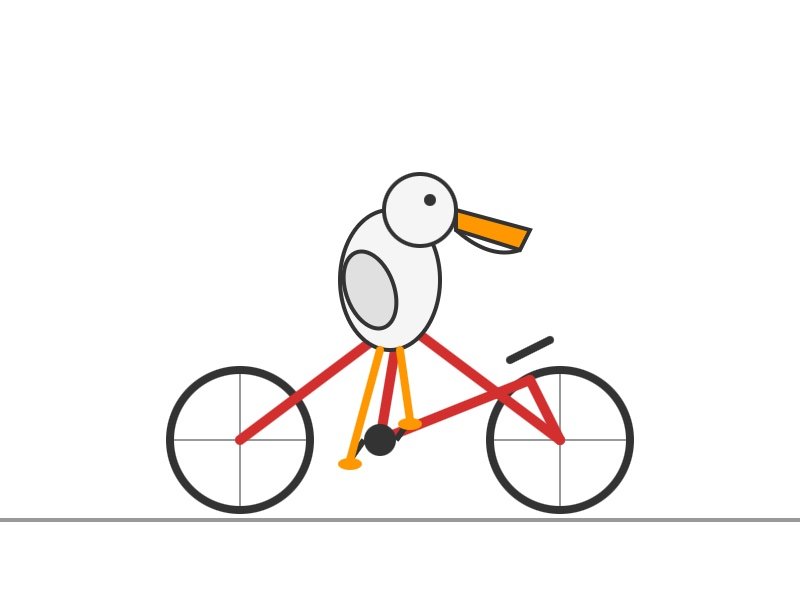
In visual reasoning tests — Willison's informal "pelican riding bicycle" benchmark, which he uses to compare image generation quality across AI products — Muse Spark's "Thinking" mode (which reasons through the task before generating output) produced noticeably better composition and realism than "Instant" mode. The slower, deliberate approach delivered a measurable quality lift.
The Python Version Gap That Matters for AI Developers
There is a meaningful technical caveat. Meta's code interpreter runs Python 3.9.25, which reached end-of-life in October 2022 — meaning it no longer receives security patches from the Python Software Foundation. Meta also bundles SQLite 3.34.1, dated January 2021, inside their execution environment — a full 19 versions behind the current 3.53.0 release. For comparison, Muse Spark's "Contemplating" reasoning mode (a longer, deeper thinking process) isn't even available to users yet — it remains a future promise.
For everyday data analysis tasks — the environment includes pandas, numpy, matplotlib, scikit-learn, PyMuPDF, and OpenCV — this version lag likely doesn't affect output quality. But developers building security-sensitive workflows, or anyone running code they don't fully control, should factor in the 4-year Python version gap before relying on Meta's sandbox for anything critical.
Three AI Automation Tools, One Direction: Local AI Is Winning
A 10 GB Google model runs audio AI on consumer hardware at zero ongoing cost. A foundational database tool finally handles schema constraints without custom workarounds. A social media company's chatbot quietly deploys 16 AI tools — while running a Python version that's been unsupported for 4 years.
The gap between "what you can run locally for free" and "what you pay for in the cloud" is shrinking faster than pricing models suggest. As Willison noted: "it's non-obvious to many people that the OpenAI voice mode runs on a much older, much weaker model" — a reminder that a higher price tag doesn't always reflect better underlying technology.
If you're a developer using SQLite, version 3.53.0 is worth upgrading to this week — the ALTER TABLE improvements alone can eliminate hours of migration scripting. If you're on Apple Silicon, Gemma 4 audio via MLX takes under 10 minutes to get running. Both are practical AI automation upgrades you can try today without opening your wallet.
Related Content — Get Started | Guides | More News
Sources
Stay updated on AI news
Simple explanations of the latest AI developments