Claude Cowork now lets you assign AI tasks from your phone
Anthropic's Cowork agent app gets a persistent mobile thread so you can assign tasks from your phone and come back to finished work. Available for Pro and Max subscribers.
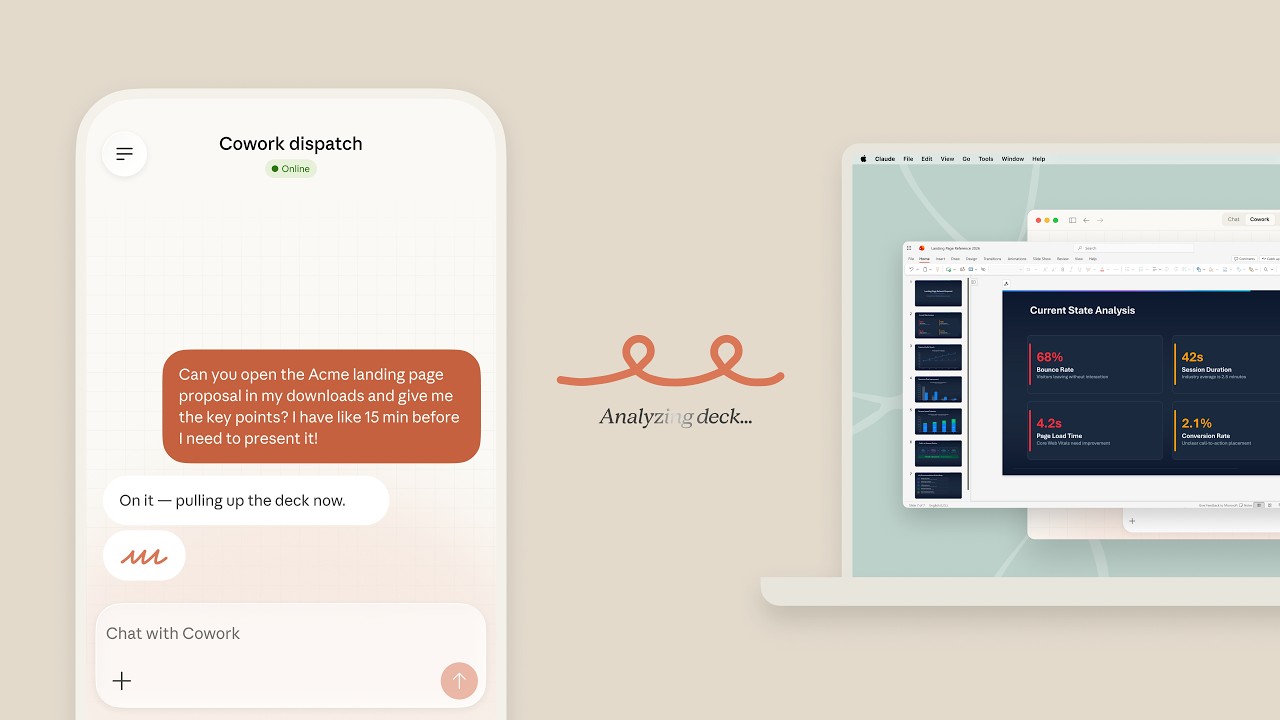
Anthropic just added a feature many Claude users have been waiting for: you can now control Cowork from your phone. The update, rolling out to Pro and Max plan subscribers, introduces a persistent agent thread that works across Claude Desktop, iOS, and Android — meaning you can start a task on your laptop, check progress from your phone on the train, and come back to finished work.

What is Cowork — and why it matters
If you haven't tried it yet, Cowork is Anthropic's agentic desktop app — think of it as Claude that can actually do things on your computer, not just chat. You describe a task ("organize my research notes into a report", "clean up this spreadsheet"), give it access to your local files, and walk away. Claude works autonomously and comes back with results.
It's aimed squarely at knowledge workers, not developers. While Claude Code dominates the coding world, Cowork is designed for the rest of us — writers, analysts, marketers, anyone drowning in repetitive tasks.
The new persistent thread: assign from anywhere
Before this update, Cowork was a desktop-only experience. You had to be at your computer to start, monitor, or adjust a task. Now, Anthropic has added a persistent agent thread — a continuous conversation that stays in sync across all your devices.
How it works in practice:
1. Start a Cowork task on your desktop — "Summarize these 15 PDFs and create a comparison table"
2. Head to lunch. Open Claude on your phone. See real-time progress.
3. Notice something? Send a quick message: "Also include the 2024 reports."
4. Come back to your desk. Finished work is waiting.
The key word here is persistent. This isn't just a notification that says "task done." It's a full thread where you can check what Claude is doing, redirect it, ask questions, and pick up exactly where you left off — on any device.
Who should try this
If you manage documents and reports: Start a research task before bed, wake up to a draft. Review it on your phone over coffee, send adjustments, and it's ready by the time you sit down.
If you're always between meetings: Assign Claude a data cleanup task from your phone while waiting for a call. No laptop needed.
If you supervise multiple tasks: Think of the persistent thread as a chat with an assistant who never sleeps. You can queue up tasks and check in whenever it's convenient.
Requirements and availability
• Plan required: Claude Pro ($20/month) or Max ($100/month)
• Platforms: Claude Desktop (Windows/macOS), Claude for iOS, Claude for Android
• Status: Research preview — Anthropic notes that "agent safety is still in development"
• Rollout: Max users got it first (March 17), Pro users within 2 days
Cowork itself is still in research preview, meaning things may change and Anthropic is actively refining the safety and reliability of autonomous agent behavior. But for early adopters, this persistent thread feature turns Cowork from a "sit and wait" desktop tool into something you can manage from the palm of your hand.
The bigger picture
This is part of a clear trend: AI companies are making their agents persistent and cross-device. OpenAI's ChatGPT recently added deep app integrations. Google Gemini is pushing into personal intelligence. Anthropic's bet with Cowork is that you don't need to babysit AI — you assign work and check in later, like you would with a human colleague.
The persistent thread makes that vision practical. It's no longer "set it and forget it" — it's "set it and manage it from anywhere."
Related Content — Get Started with Easy Claude Code | Free Learning Guides | More AI News
Stay updated on AI news
Simple explanations of the latest AI developments