Prerequisites — You Already Have Everything
Want to use AI from anywhere? On the subway to work, at a cafe, before bed—control Claude Code on your home PC remotely with just your smartphone. The solution is Telegram bot integration.
✅ Already installed
- ✅ Windows PC
- ✅ Claude Code (CLI)
- ✅ Claude Pro subscription & logged in
📋 Today’s tasks
- 1️⃣ Get a Telegram bot token
- 2️⃣ Download cokacdir
- 3️⃣ Run the bot server → Done!
Why Telegram?
Unlike other messaging apps, Telegram provides a free bot API officially. Creating and integrating a bot requires no fees or business registration.
STEP 1: Get a Telegram Bot Token
📁 Create a workspace folder
First, create a folder where cokacdir files and AI conversation logs will be stored.
📱 Install Telegram
- Install "Telegram" from your phone’s app store
- PC: Download the desktop app from telegram.org
- Sign up with your phone number
🤖 Get a bot token
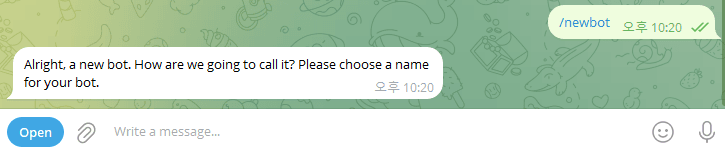
- Search for @BotFather → START BOT
- Type
/newbot - Set bot name (e.g., My AI Assistant)
- Set username (e.g., myai_helper_bot) — must end with
_bot - Copy the issued token!
The token is a password
The bot token is a long string like 7123456789:AAH.... Anyone with this token can control the bot, so never share it publicly.
STEP 2: Download cokacdir
Just have Claude Code do it. Enter the following in the Claude Code session from STEP 1.
Download cokacdir.
The official repo is https://github.com/kstost/cokacdir.
Save to the current folder,
and also open a new PowerShell window at this path.
When Claude Code asks for approval, just press Y. Download + opening a new PowerShell window completes automatically.
STEP 3: Run the Bot Server
This is the only thing you run manually. In the new PowerShell window Claude Code opened, enter:
.\cokacdir.exe --ccserver <paste-your-bot-token-here>

# Example:
.\cokacdir.exe --ccserver 7123456789:AAH_abcdefg...
On first run, select “Open in Terminal (app).” Your Claude Pro account from the previous session connects automatically.
Why run this manually?
Cokacdir uses a terminal UI (TUI) which can’t run inside Claude Code. It must be run directly in a separate PowerShell window.
Test It Out
Once the bot server is running, send a message to the bot you created in Telegram.
Hello! Who are you?
What's the weather like today?
Show me the list of files in the current folder
When Claude Code on your PC receives the message, it performs web searches, file read/write, code execution, report generation, and sends the results back via Telegram.
Understanding: What Is cokacdir?
Now that you’ve confirmed the bot works, let’s understand how it works.
Cokacdir is a Telegram integration tool that calls the Claude CLI. It runs on your PC using your own Claude account login, so it’s 100% policy compliant.
Core principle
Cokacdir logs in directly with your Pro subscription on your PC. Login credentials exist only on your PC and are never shared with third parties.
How It Works
It runs directly on your Windows PC. No WSL needed.
Windows native!
Cokacdir runs as a single Windows exe file. No additional installs like WSL or Tailscale needed.
OpenClaw vs cokacdir
There are two main ways to connect Telegram with Claude Code.
| 🐾 OpenClaw | 🤖 cokacdir | |
|---|---|---|
| Description | Open-source messenger AI agent | Claude Agent SDK-based Telegram integration |
| Auth method | Sends your login credentials to a third party | Logs in directly on your PC |
| Execution location | Third-party server uses your account | Calls Claude CLI directly on your PC |
| Anthropic policy | ⚠️ Violation (officially prohibited) | ✅ Compliant (uses official CLI) |
| Security | Risk of credential leak & runaway | Login credentials exist only on your PC |
| Account safety | Possible ban | Safe |
OpenClaw’s Critical Problem
OpenClaw’s core issue is handing your Claude Pro subscription credentials to a third-party program. It’s like lending your credit card to a stranger.
Anthropic has officially prohibited using Free, Pro, and Max account OAuth tokens in third-party tools.
Others can make API calls with your account. File system browsing cases have been reported on public Discord servers.
An actual incident occurred where an agent went haywire, sending 500+ messages indiscriminately.
Bottom line
OpenClaw is convenient but can lead to account bans due to policy violations. This guide uses the safe cokacdir.
Key Difference: Authentication Method
An analogy makes this easy to understand.
🐾 OpenClaw
💳 Lending your credit card to a stranger and saying "go shopping for me"
- Don’t know how much they’ll spend
- Don’t know where they’ll use it
- Outside your control
🤖 cokacdir
🏠 Taking money from your own safe at home, "I hold the key"
- Token exists only on your PC
- You have complete control
- No additional costs
Error: Invalid API key
You successfully logged in with claude auth login via OAuth, but running cokacdir gives this error.
Error: Invalid API key · Fix external API keyCause: API key takes priority over OAuth
Claude CLI checks authentication in this order:
- Environment variable
ANTHROPIC_API_KEY— if present, always uses this - OAuth token (
.credentials.json) — only when env var is absent
If an old invalid/expired API key remains, it overrides your working OAuth login.
Solution
Step 1: Check the environment variable
echo $env:ANTHROPIC_API_KEYIf a value is printed → that’s the culprit. If nothing appears, go to step 2.
Step 2: Remove the environment variable
$env:ANTHROPIC_API_KEY = ""[System.Environment]::SetEnvironmentVariable("ANTHROPIC_API_KEY", $null, "User")Or go to System Properties → Environment Variables and delete ANTHROPIC_API_KEY directly.
Step 3: Verification test
claude -p "hello"If you get a normal response, OAuth auth is working. Re-run cokacdir.
Additional places to check
API keys can hide in other places besides environment variables:
- A
set ANTHROPIC_API_KEY=...line inside the cokacdir launch BAT file - A
.envfile in the workspace folder - An apiKey setting in
%USERPROFILE%\.claude\settings.json
Check all of these and delete any API key entries.
Error: OS error 193
Running cokacdir produces this error.
OS error 193: %1 is not a valid Win32 applicationCause: claude.cmd ≠ claude.exe
Cokacdir (a Rust binary) internally runs claude -p "message". However, installing via npm install -g @anthropic-ai/claude-code on Windows creates claude.cmd (a batch file), not claude.exe.
Rust programs cannot execute .cmd files directly. It’s like being told “this file is not a program.”
Understanding the Issue
Solution: Create an EXE shim
You need to create a real .exe file that wraps claude.cmd. Let Claude Code handle it.
When cokacdir tries to run claude, I get "OS error 193".
The issue is npm's claude.cmd can't be recognized as .exe by the Rust binary.
Fix this so claude.cmd can be executed properly.
Claude Code will automatically perform these steps:
Want to fix it manually?
Find the folder containing claude.cmd (usually %APPDATA%\npm\), and place a wrapper EXE in the same path that runs claude.cmd via cmd.exe /c.
where.exe claudeThis involves manual work, so we recommend letting Claude Code handle it. AI does it in 30 seconds.
Creating an Auto-Start BAT File
Instead of opening PowerShell and typing commands each time, create a BAT file that starts cokacdir with a single double-click.
@echo off
cd /d "C:\Users\YourUser\my-ai-bot"
set CLAUDE_CODE_BUBBLEWRAP=1
start "MyBot" cokacdir.exe --ccserver paste-your-bot-token-herecd /d path
The workspace folder containing CLAUDE.md. The bot's role/rules are determined by this file.
CLAUDE_CODE_BUBBLEWRAP=1
Sandbox mode. Prevents the bot from making system changes.
No ANTHROPIC_API_KEY
We use OAuth authentication, so don't add an API key. Adding one causes Invalid API key errors!
Auto-start on Windows boot
Win + R → type shell:startup → place a shortcut to the BAT file in the opened folder. The bot starts automatically every time you turn on your PC.
If it still doesn't work, check these
Check these 5 things and you can diagnose most issues:
claude --version— Verify CLI versionecho $env:ANTHROPIC_API_KEY— Check API key env varwhere.exe claude— Check claude executable path- Full contents of the launch BAT file
- Complete error log from cokacdir execution
Use Case 1: Send & Receive Files
[Attach Excel file]

Analyze this sales data,
create a monthly trend chart,
and send me the report
What AI does:
- Saves the attached file to your PC
- Analyzes data with Python
- Generates chart images
- Compiles into a report file
- Sends the result file back via Telegram
Complete a report on the subway
Send Excel from the subway → your home PC analyzes it → the report arrives in Telegram.
Use Case 2: 24/7 Auto Assistant
👤 "Every morning at 8am, send me the weather and news summary"

🤖 Schedule registered! Will run daily at 08:00.

─────── Next morning 8:00 ───────

🤖 Good morning!
🌤️ New York: Sunny, 54°F
📰 3 news summaries sent
Just keep your PC on and the bot works while you sleep, sending results to you.
Use Case 3: One-Line Command → Complete Report
"Research the 2026 AI market trends and create a report"

🤖 Web search → Analysis → Chart generation...

🤖 Done! 📎 AI_Market_Trends_2026.html (with charts)Web search
Collects latest data in real-time
Analysis & organization
AI extracts and organizes key points
Report generation
Sends as a complete file with charts
Advanced prompt: Report hub
"Create a report archiving web page. Scan .html files in the current folder, auto-extract title, date, and category, and build a card list with category filters. Serve on port 5321 so phones on the same Wi-Fi can access it." — Long, detailed instructions like this are handled in one shot.
Use Case 4: Receipts → Auto Expense Tracker
👤 [Receipt photo 📸]
🤖 Saved! Starbucks $6.50 (Cafe)

👤 [Receipt photo 📸]
🤖 Saved! Convenience store $12.30 (Food)

👤 [Card notification screenshot 📱]
🤖 Saved! Amazon $45.90 (Online shopping)👤 "Create this month's expense report"
🤖 March expense report complete!
📎 March_Expense_Report.html
· Total $1,842.50
· Category chart includedNo expense tracking app needed. Just snap receipts and send to Telegram. AI manages the cumulative data, and one sentence at month-end produces a chart-included report.
Use Case 5: Multi-Bot by Project
Create additional bots with BotFather and run another cokacdir instance. Switch between purpose-specific AI assistants like switching Telegram chats.
Work bot
- · Report writing
- · Email drafts
- · Data analysis
Study bot
- · Language practice
- · Exam prep
- · Paper summaries
Life bot
- · Recipe suggestions
- · Expense tracking
- · Schedule reminders
Each bot has independent conversations & memory
Each bot has its own conversation context. What you tell the work bot, the study bot doesn’t know.
Use Case 6: AI That Remembers You
── March 3 ──

👤 "I can't eat spicy food. Remember that."
🤖 Noted! I'll exclude spicy food from now on.

── One week later ──

👤 "What should I have for lunch?"
🤖 Excluding spicy food, here are my suggestions!
🍝 Cream pasta — "Pasta Place" near downtown (5 min walk)
🍱 Salmon poke — "Poke Salad" (8 min walk)
Conversation history is saved on your PC. The longer you use it, the better AI knows you. Unlike ChatGPT, data exists only on your computer, so your privacy is protected.
Key Takeaways
Your AI, safely, from anywhere
Take the AI that used to be stuck at your terminal and carry it in your pocket. With Telegram, file analysis, auto-scheduling, web research, report generation, code execution, translation, and more — all from your phone.