Execute Now
Tired of copying report content into PowerPoint slides? One prompt is all you need. Let’s have Claude Code do it right away.
Prompt
Create a presentation on "AI Work Automation Proposal".
5 slides, include charts, save as proposal.pptx using python-pptx.
What Claude Does
Given this single instruction, Claude Code plans and executes autonomously.
- Installs python-pptx — Automatically installs the required library
- Designs slide structure + writes content — Creates 5 slides with titles and body text appropriate to the topic
- Auto-inserts charts/tables — Generates data and inserts charts into slides
- Applies color theme + layout — Professional look with consistent design
- Saves proposal.pptx — Creates a .pptx file you can open immediately
Why python-pptx?
python-pptx is a Python library for creating PowerPoint files. Claude Code writes Python code → runs it → generates the .pptx file.
But you don’t need to know Python at all. Claude handles everything.
Check the Results
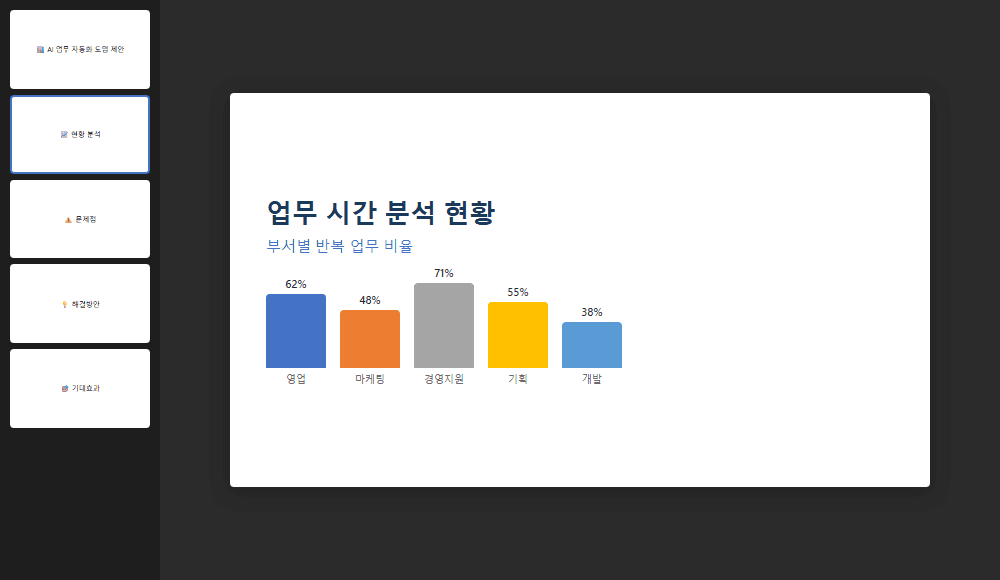
When it finishes, a proposal.pptx file appears in your workspace folder. Open it to see a structure like this.
| Slide | Content |
|---|---|
| 1 — Cover | AI Work Automation Proposal + presenter/date |
| 2 — Current State | Work time analysis chart (repetitive task ratio) |
| 3 — Problems | Inefficiency points of manual work |
| 4 — Solution | Comparison chart of AI automation benefits |
| 5 — Expected Impact | Time savings + ROI summary |
Use Claude inside PowerPoint
Claude Pro subscribers and above can also use Claude directly inside PowerPoint. Select a slide and ask the AI for edits—edit without leaving PPT. python-pptx approach vs. Claude inside PowerPoint — choose what fits the situation.
File won't open?
If PowerPoint isn’t installed, you can’t open .pptx files.
Open in Google Slides: Upload to Google Drive → Right-click → “Open with Google Slides”
Or use the free LibreOffice Impress.
Try It With Your Own Topic
Now try it with a topic relevant to your own work.
Create a PPT on "AI Work Automation Proposal".
Sections: Current State, Problems, Solutions, Expected Impact, Timeline.
Save as .pptx using python-pptx.
Prompt variation ideas
Adapt the topic to your own work.
- • “2025 Marketing Performance Report”
- • “New Project Kickoff Presentation”
- • “Team Weekly Status Report”
- • “Customer Satisfaction Analysis Results”
Checklist
- .pptx file created — Did the file appear in your workspace folder?
- 5+ slides — Does it follow the structure you requested?
- Open and verify — Double-click to open in PowerPoint
Not happy with the result?
Don’t worry. Just ask for changes in plain English. In fact, this is exactly what the next topic — “vibe coding” — is all about.
Understanding: Vibe Coding
You just created a PPT by talking to AI, right? This is actually one of the hottest buzzwords right now: Vibe Coding.
Instead of writing code yourself, you describe the desired result in natural language, and AI writes and runs the code. It’s one of the hottest keywords in the 2025 AI industry.
You're already vibe coding
When you said “make me a PPT,” Claude Code wrote python-pptx code and executed it, right?
That’s vibe coding. You were already doing it!
Iterative Improvement Example
The core of vibe coding is evolving the output through ongoing conversation. It doesn’t have to be perfect on the first try. Just keep requesting revisions.
| Revision request (prompt) | What Claude does |
|---|---|
| “Add the company logo to the PPT” | Finds the image file and inserts it into the slide |
| “Add a monthly trend chart to the Excel” | Analyzes data, generates chart, inserts it |
| “Make the content on slide 3 more detailed” | Enhances the body text of that slide |
| “Add a summary sheet at the beginning” | Inserts a new slide at position 1 |
Real-World Vibe Coding Applications
You can build all of these with vibe coding. No coding knowledge required.
- Personal website — “Build my portfolio site”
- Work tools — “Create a team schedule management web app”
- Data dashboard — “Create an HTML page that shows sales data in charts”
- Automation scripts — “Create a program that auto-generates reports every Friday”
Know the limits of vibe coding
Vibe coding lets you quickly build simple tools and prototypes, but large-scale systems or security-critical services still need professional developer review. The “80% AI, 20% human” principle applies here too.
No Coding Required
The biggest advantage of vibe coding is that zero programming knowledge is needed.
- You don’t need to read code
- You don’t need to know syntax
- If an error occurs, just say “there’s an error, fix it”
- Describe what you want, and AI builds it — that’s all there is to it
Vibe coding = a new work skill
Coding used to be a developer’s domain, but vibe coding is something anyone can do.
Just like using spreadsheets, talking to AI is becoming a work skill.
Those who pick up this skill first will be ahead.
Free Experiment Ideas
Now that you’ve got the basics down, it’s time to experiment freely. Pick one of the ideas below and try it with Claude Code.
Document / Data Processing
| Try this | Prompt example |
|---|---|
| Find duplicate data | “Find and highlight duplicate names in this Excel file” |
| Create a PDF summary table | “Read this PDF and organize key points into a table” |
| Draft a report | “Create a monthly report draft from this data” |
| Merge multiple files | “Merge all the Excel files in this folder into one” |
Communication Organization
| Try this | Prompt example |
|---|---|
| Write a status email | “Draft a status report email to my manager using this content” |
| Translate English materials | “Translate this English report and summarize it” |
| Organize to-do list | “Extract action items from these meeting notes” |
| Classify customer feedback | “Classify this feedback list as positive/negative/improvement request” |
Remember while experimenting
Some things won’t work, and some will amaze you.
Failures are okay. In fact, failing teaches you AI’s limits and strengths. The important thing is trying it yourself.
Free Experiment Tips
- Start small — One file, one task at a time
- Be specific — “Make it nice” is worse than “organize it as a table”
- Iterate on failure — “No, change it like this instead” works fine
- Save good prompts — Note down prompts that worked well. You’ll reuse them